Team-Wide Design Consistency: Zendeck's Shared Templates That Work
Let's be honest — you've sat through a quarterly review where five people presented, and every deck looked like it came from a different company. One used a dark navy template with serif fonts. Another went with a bright gradient and rounded corners. The third just re-exported slides from a PDF someone emailed three years ago. Nobody did it on purpose. Everyone simply picked whatever template felt right at the moment.
That's the real problem with team presentations: it's never one bad deck. It's the slow, silent fragmentation of your brand across dozens of decks, built by people who all meant well. And the fix isn't more design training — it's structural. Shared templates that lock the rules so nobody has to remember them.
I. The real cost of fragmented branding
When every teammate picks their own template, you don't just lose visual consistency — you lose trust. Clients and stakeholders read inconsistency as disorganization. Internally, reviewers burn hours realigning fonts, fixing colors, and re-exporting logos. A deck that should take two hours takes six, and most of that time is cleanup, not content.
The cost compounds as your team grows. Three people, three templates, minor chaos. Twenty people, twenty templates, and your brand is effectively invisible. Every new hire adds another interpretation of "on-brand," and every deck becomes a negotiation instead of a deliverable.
The outcome of fragmented branding is predictable: more revision rounds, longer production times, and a brand that stops meaning anything. We'll put real numbers on this in a moment.
II. Why individual template choice fails
The instinct to let everyone choose their own template comes from a decent place — creative freedom. But freedom without guardrails produces chaos. When five people interpret "on-brand" five different ways, the brand stops being a signal and becomes noise.
There's also a hidden workflow cost. When templates live in personal files, there's no single source of truth. Someone updates the logo, but only three people get the new file. Someone fixes a broken layout, but the fix never reaches the rest of the team. The template library fragments exactly the way the brand does.
This is why design teams abandoned this model years ago. Professional design tools like Figma have long pushed teams toward shared libraries and reusable components, precisely because individual choice at scale always produces inconsistency. The same logic applies to presentation decks — and it's the core idea behind Zendeck's shared template approach.
III. What shared templates actually do
A shared template library is exactly what it sounds like: a single, approved collection of templates that every team member starts from. Instead of hunting through personal files or free template sites, your team opens the shared library, picks the approved baseline, and builds from there.
The outcome: every deck starts from the same fonts, colors, and layout grid. Consistency becomes the default, not the exception.
But shared templates aren't just about locking things down. They're about removing decisions that shouldn't exist. When the structural rules are already set, your team spends its energy on what actually matters — the story, the data, the argument — instead of debating whether the title should be 28 or 32 points.
IV. How Zendeck's shared template library works
Zendeck's approach rests on three layers: the shared library, brand kits, and smart layout. Here's how they fit together.
Step 1: Set up your brand kit once
Define your fonts, colors, and logo in a single brand kit. This becomes the source of truth for every deck your team creates. If you're new to this, our guide on setting up brand kits in Zendeck walks through the whole process in about ten minutes.
Step 2: Publish approved templates to the shared library
Build a template you love, lock the brand rules, and publish it to the shared library. From that moment, every team member starts from an approved baseline — no more "I found this cool template online" moments.
Step 3: Everyone starts from the shared library
When a teammate creates a new deck, they open the shared library instead of a blank canvas or a personal file. The template's fonts, colors, and layout grid are already applied. 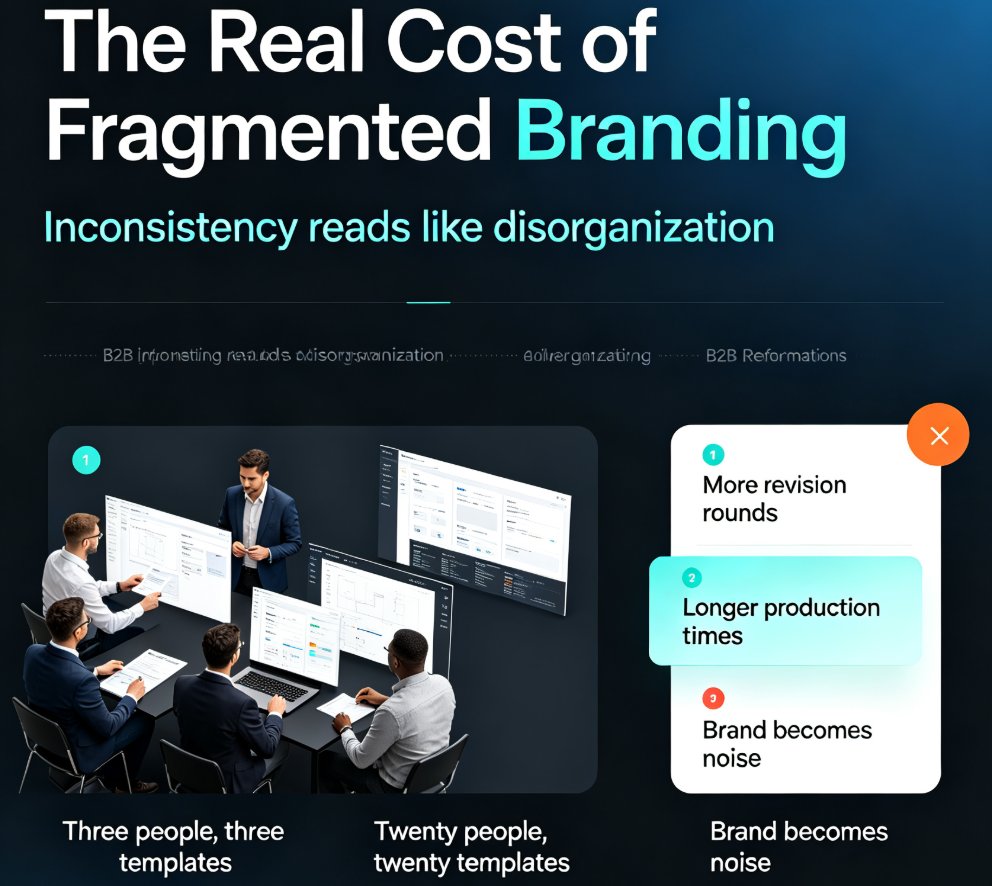
Step 4: Smart layout keeps everything aligned
As content flows in, Zendeck's smart layout automatically applies the template's spacing, alignment, and typography rules. Text that overflows gets reflowed. Images get placed on the grid. The result looks like it came from one designer, even when five people contributed.
If you want the deeper mechanics, our piece on maintaining brand consistency across hundreds of slides with AI brand kits covers the full workflow.
V. Locking brand rules without killing creativity
The most common objection to shared templates is the fear that they turn everyone into robots. In practice, the opposite happens. When the structural rules are locked — fonts, colors, spacing — people spend their creative energy on content, story, and data visualization instead of fiddling with margins.
◉ Won't shared templates make every deck look identical?
That's the most common fear, and it's worth addressing directly. The answer is no — because the locked layer is structural, not creative. Colors and fonts are fixed, but content layouts, chart styles, and visual emphasis remain open to the creator's judgment. Two people can use the same template and produce decks that feel completely different, because the difference lives in the content, not the chrome.
Think about it: the best designers don't reinvent layout grids for every project. They work within a system so they can focus on the parts that actually differentiate the work. Shared templates give your team the same freedom. The brand is handled; the thinking is yours.
Zendeck's brand kits are designed to be strict where it matters and flexible where it doesn't. That balance is what makes shared templates sustainable — teams adopt them because they make work easier, not because they're forced.
VI. Best practices from professional design systems
Design teams have solved this problem for years, and their playbook transfers directly to presentation decks. Figma's guidance on shared libraries recommends starting with small, atomic components — a button, a card, a color style — and nesting them into larger templates. The same logic applies here:
- Lock the atoms first. Colors, fonts, logo, and basic shapes are your non-negotiables. Everything else can flex.
- Build reusable molecules. Title bars, content layouts, chart styles, and callout boxes become repeatable building blocks.
- Keep the library curated. A shared library with 200 templates is just a graveyard. Ten well-designed templates beat fifty random ones.
This is also where Zendeck's zero-design brand governance with smart templates shines — the governance is baked into the tool, so you don't need a design team to enforce it.
VII. The numbers: individual vs shared templates
Let's put some concrete numbers on the difference. The chart below shows the average time to produce a branded deck under three scenarios: no template at all, individual template choice, and a shared template library.
The pattern holds across every metric that matters:
| Metric | Individual templates | Shared templates | Improvement |
|---|---|---|---|
| Time per branded deck | ~6 hours | ~2.5 hours | ~58% faster |
| Revision rounds before approval | 3–4 | 1–2 | ~50% fewer |
| Brand consistency score | ~60% | ~95% | +35 points |
| New hire ramp-up time | 2+ weeks | 2–3 days | ~80% faster |
These aren't magic numbers — they're the natural result of removing repetitive decisions. When the template, fonts, and layout are already correct, the only remaining work is content. If your team's decks still look off-brand despite everyone's best efforts, our guide on why AI slides look off-brand and how to fix it fast covers the common culprits.
VIII. Getting your team started
You don't need a design department or a month-long rollout. Here's a practical checklist:
- Audit your current decks. Collect five recent team presentations and note where they diverge — fonts, colors, layouts, logo usage.
- Define your non-negotiables. Pick the fonts, colors, and logo rules that must never change. Everything else can flex.
- Build one template, not ten. Start with a single approved template and publish it to the shared library. Add variations only when a real need appears.
- Publish and communicate. Make the shared library the default starting point and tell the team why. Show them the time savings, not just the rules.
- Review quarterly. Templates drift. Set a recurring review to keep the library curated and current.
If you want to go deeper on the setup side, our five-step guide to building a custom branded template walks through the exact process, and the five ways to create a custom brand kit piece covers the variations you can use.
FAQ
How do shared templates in Zendeck keep every team member's deck consistent?
Shared templates lock the structural rules — fonts, colors, spacing, and layout grid — so every deck starts from the same approved baseline. When combined with Zendeck's brand kits and smart layout, the result is that decks look like they came from one designer, even when multiple people contribute.
Can team members still customize shared templates without breaking brand rules?
Yes. Zendeck locks the non-negotiables (colors, fonts, logo) while leaving content layouts, chart styles, and visual emphasis open to the creator's judgment. This gives teams creative freedom where it matters without letting the brand drift.
How do I set up a shared template library for my team in Zendeck?
Start by setting up a brand kit with your fonts, colors, and logo. Then build a template, lock its brand rules, and publish it to the shared library. From that point, every team member starts from the approved baseline. The full walkthrough is in our brand kit setup guide.
Do shared templates slow down creative work?
The opposite. When structural rules are already set, your team spends its energy on content, story, and data instead of debating margins and font sizes. Most teams find decks get produced faster, not slower.
How often should we review our shared template library?
Quarterly is a good rhythm. Templates drift as your brand evolves, so a recurring review keeps the library curated and current. Ten well-designed templates beat fifty random ones.