Turning SOPs into Video Training: A Step-by-Step AI Guide
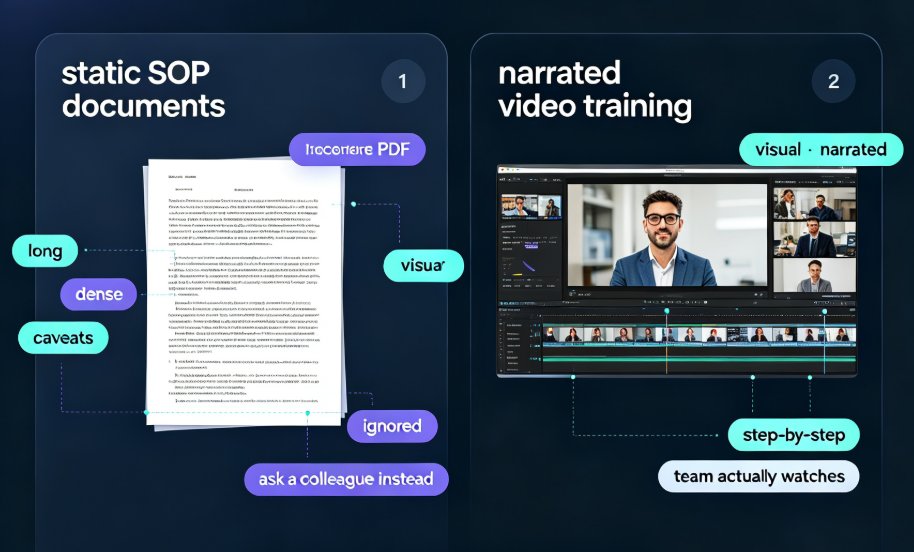
Let's be honest: no one reads SOPs. You write them, file them, and then hope your team opens them when they need them. But the reality is that static documents get ignored—especially when they're long, dense, and full of caveats. That's why forward-thinking L&D teams are turning their standard operating procedures into narrated video training.
With Zendeck, you can convert a Word, PDF, or PowerPoint SOP into a polished, narrated micro-course in minutes. The result? Onboarding time drops from 2 hours to 30 minutes, and your team actually watches the content. Here's the step-by-step workflow that makes it happen.
01 Why SOPs Fail as Documents (and Why Video Works)
Static SOPs are a silent productivity killer. They're written for the eyes, not for the brain—passive voice, cautious language, endless bullet points. When an employee needs to remember a procedure, they'd rather ask a colleague than dig through a 20-page PDF.
Solution: Video converts procedural knowledge into a visual, narrated format that respects how people actually learn. A short video that walks through the steps with screen captures, diagrams, and a calm voice beats a wall of text any day.
Outcome: Higher completion rates, better retention, and fewer "I didn't know that" conversations.
The 2-hour onboarding session can become a 30-minute video your team actually finishes. According to Zendeck's own research, teams using AI voiceover have seen onboarding time shrink dramatically. That's a 75% reduction in training time—and that's just the beginning.
02 The Step-by-Step AI Workflow: From SOP to Published Video
Step 1: Upload Your SOP Documents
Start by gathering your existing materials. Zendeck supports Word documents, PDF manuals, PowerPoint decks, and even plain text. You can upload files up to 200MB—plenty for even the most detailed procedures. No need to reformat or restructure your content; the system accepts it as-is.
Step 2: Let AI Parse and Generate a Structured Script
Once your document is uploaded, the AI analyzes the content, extracts key steps, and generates a structured outline and script. It doesn't just copy your text—it reorganizes it into a sequence that makes sense for a video. The AI identifies critical actions, decision points, and warnings, and turns them into a narrative flow that keeps viewers engaged.
Step 3: Design Slides Automatically
Next, Zendeck applies its smart layout engine to transform the script into visual slides. It picks appropriate templates from a vast template library, inserts icons, and arranges text so everything is readable at a glance. You don't need design skills—the AI handles visual consistency for you, and you can easily tweak anything if you want a custom look.
Step 4: Add Narration and Voiceover
Now the magic happens. Zendeck's AI voiceover reads your slides aloud in a natural, human-like tone. You can also combine this with an AI avatar if you want a presenter on screen. The system syncs narration to slide transitions, so your video feels like a professional production. Want to add subtitles or captions? The tool auto-generates them, making your content more accessible—a great complement to our guide on adding narration.
Step 5: Publish and Share
Once you're happy with the result, export your micro-course as a video file or share it via a link. Employees can watch it on any device, at their own pace. And because it's a video, you can add quizzes or polls to boost engagement, just as we explain in our interactive quiz tutorial. The final output is a reusable learning asset that lives in your knowledge video library.
03 Core Capabilities That Make SOP-to-Video Work
Not all AI video tools are created equal. Based on our experience, here's what you need for a repeatable SOP-to-video workflow:
| Capability | Why It Matters | Zendeck's Approach |
|---|---|---|
| Direct document ingestion | Accepts Word, PDF, PPT, and text so you don't have to reformat | Upload up to 200MB, or paste text directly |
| Script generation | Turns bullet points into a conversational narrative | Automatic outline and scene segmentation |
| Visual design | Creates slides that look professional without a designer | Smart layout engine with contextual templates |
| AI voiceover | Adds narration without hiring voice actors | Natural-sounding voices with adjustable pace |
| Version control | Updates your video when the SOP changes | Re-import the revised document and regenerate |
This table isn't just theory—it's the difference between a tool that's a toy and one that can handle real corporate training at scale. For a deeper look at how AI is reshaping corporate training, check out our analysis of AI-generated video decks.
04 Keeping Your SOP Videos Updated (The Overlooked Critical)
Here's where most SOP-to-video projects go wrong: they create the video once, and then the SOP changes. Six months later, the video is outdated, and you're back to square one.
The key is a tool that lets you regenerate from the source document. When you update your Word or PPT, just re-upload it to Zendeck. The AI will re-parse the content, adjust the script, and produce an updated video with the same branding and narration style. No need to start from scratch.
This is a game-changer for compliance training, where procedures change frequently. Instead of re-shooting or re-editing, you have a repeatable pipeline. It's the reason why many teams now consider AI PPT-to-video the 2026 corporate training standard.
05 Practical Tips for L&D and Operations Teams
- Start with your most critical SOP. Choose the procedure that has the highest training volume or the most mistakes.
- Keep scripts short. Break complex procedures into 3–5 minute micro-courses. Each video should cover one clear outcome.
- Add captions and subtitles. Not only does this improve accessibility, but it also helps employees review content in noisy environments. Zendeck can auto-generate subtitles for you.
- Test with a pilot group. Get feedback before rolling out to the whole company.
- Measure completion rates. Use analytics to see who watched and where they dropped off. This data helps refine your next video.
If you're new to the idea of training videos, you might also enjoy our list of 5 hidden features that boost team productivity—many of which apply here.
Visualizing the Impact: A Quick Look at Onboarding Time
Figure: Illustrative comparison based on Zendeck's reported onboarding time reduction.
FAQ
Q1: What file formats can I use to create a training video with Zendeck?
A1: Zendeck supports Word documents, PowerPoint decks, PDF manuals, and plain text. You can upload up to 200MB per file.
Q2: Do I need any design or video editing skills?
A2: No. Zendeck's AI automatically generates the slide design, script, and narration. You just upload your document and review the final video.
Q3: How long does it take to turn an SOP into a video?
A3: Most conversions take under 10 minutes, depending on document length. The AI parses the content, generates the script, and produces slides with voiceover in a single pass.
Q4: Can I update the video when my SOP changes?
A4: Yes. Simply re-upload the revised document and Zendeck will regenerate the video with your original branding, keeping it always up to date.
Q5: Is the narration voice natural?
A5: Zendeck offers multiple AI voices that sound human-like, with adjustable pace and tone. You can also combine narration with AI avatars for a more personalized presenter experience.