How to Turn a Brain Dump into a Structured Presentation with AI
You've got the ideas. They're all in your head—or scattered across a sticky note, a chat thread, and a half-written email. The moment you open PowerPoint, the cursor blinks on that empty slide, and your brain goes blank. We've all been there. The blank page is the enemy of productivity, and for anyone who needs to present—whether it's a quarterly review, a training module, or a pitch—that first step is the hardest.
But here's the thing: you don't need to start from zero. With AI, you can turn that messy brain dump into a structured, professional presentation in minutes. And no, you don't need to be a designer or a PowerPoint wizard. You just need the right tool and a simple workflow.
Let's be real: the hardest part of any presentation isn't the design—it's the structure. Once you have a clear outline, the slides almost build themselves. That's where Zendeck comes in. It's an AI-powered presentation platform that takes your raw thoughts and turns them into a coherent deck, so you can skip the blank-page panic and get straight to the good stuff.
01. The Blank Page Problem: Why Starting Is So Hard
Every professional knows the feeling. You have a topic, maybe a few bullet points, and a deadline. But when you sit down to create the deck, you're not sure where to begin. Should you lead with the problem? The solution? The data? How many slides do you need? What's the logical flow?
The blank page forces you to make dozens of decisions before you've even written a single slide. That's cognitive overload, and it's why so many people procrastinate on presentations.
The traditional approach—opening PowerPoint, adding a title slide, then staring at the screen—is inefficient. You're trying to do three things at once: organize your thoughts, design the visuals, and write the content. It's no wonder it takes hours.
But what if you could separate those tasks? What if you could first dump your ideas, let an AI organize them into a structure, and then focus only on refining the content and visuals? That's the core idea behind AI presentation tools like Zendeck.
02. How AI Turns Chaos into Structure: The Core Workflow
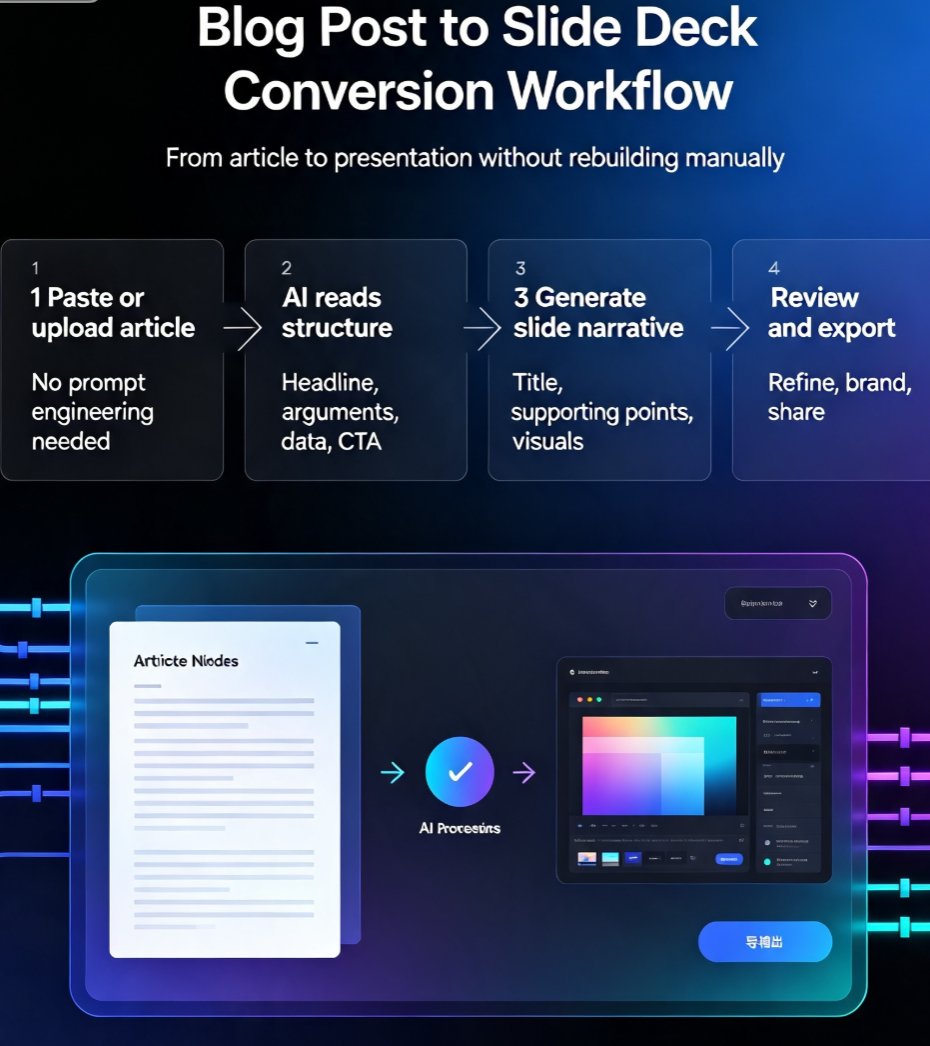
AI presentation tools work by analyzing your input—whether it's a topic, a paragraph, or a list of bullet points—and generating a structured outline. This isn't just a random grouping of ideas; it's a logical flow that follows presentation best practices.
The AI acts as your thinking partner, organizing your scattered thoughts into a narrative that makes sense to your audience.
Here's what happens under the hood:
- Input: You provide your raw material—a topic, notes, a Word doc, or even a Markdown file.
- Outline Generation: The AI breaks your content into sections, identifies key points, and arranges them in a logical order.
- Slide Creation: Once you approve the outline, the AI generates individual slides with appropriate layouts, headings, and placeholders for visuals.
- Customization: You can then edit, reorder, or restyle anything—without starting over.
This workflow eliminates the hardest part: the blank page. You're not creating from nothing; you're refining something that already exists.
03. Step-by-Step: Turning Your Brain Dump into a Deck with Zendeck
Let's walk through a real scenario. Say you're a consultant who just finished a client workshop. You have pages of notes, sticky notes, and a rough idea of what the final presentation should cover. Here's how you'd use Zendeck to turn that mess into a polished deck.
Step 1: Dump Everything into Zendeck
Open Zendeck and create a new presentation. You'll see options to paste free text, upload a Word document, or even import a Markdown file. Don't worry about formatting—just get your thoughts out. You can paste a paragraph, a list of bullet points, or even a transcript of your brainstorming session.
Step 2: Let the AI Generate an Outline
Once you submit your content, Zendeck's AI analyzes it and generates a structured outline. You'll see slide sections appear, each with a title and key points. This is your skeleton—the logical flow of your presentation.
You're not locked into this outline. You can edit section titles, reorder slides, remove irrelevant parts, or add new ones. The AI gives you a starting point, but you're in control.
Step 3: Choose a Template and Customize
After you're happy with the outline, pick a template from Zendeck's library of 500+ designs. If your company has a brand kit, you can apply it instantly to keep colors, fonts, and logos consistent. The AI will automatically adjust the layout to match your content.
Step 4: Refine and Polish
Now you can dive into individual slides. Add specific data, tweak the wording, or swap in visuals from Zendeck's asset library. The AI also offers design suggestions—like better font pairings or alignment fixes—so your deck looks professional even if you're not a designer.
Step 5: Export or Share
When you're done, export to PPTX, PDF, or Google Slides, or share a link for real-time collaboration. You can even turn your deck into a narrated video with Zendeck's PPT-to-video feature—perfect for micro-courses or async updates.
This entire process takes 10–15 minutes for a standard deck, compared to the 2–3 hours you'd spend doing it manually. That's a 70% time savings, and you get a better result because the AI handles the structural thinking.
04. Why Structure Matters More Than Design
You might be thinking, "Sure, the AI saves time, but does it really produce a better deck?" The answer is yes, and here's why.
A well-structured presentation is more persuasive, easier to follow, and more likely to achieve its goal.
When your slides follow a logical flow—problem, solution, evidence, action—your audience can absorb the information without getting lost. The AI is trained on presentation best practices, so it naturally applies these principles. You get a narrative arc that builds toward your conclusion, not just a random collection of slides.
Moreover, structure reduces cognitive load for both you and your audience. You don't have to remember what comes next; the deck guides you. And your audience doesn't have to work to connect the dots; the flow is intuitive.
05. Manual vs. AI: A Side-by-Side Comparison
Let's put the numbers on the table. Here's a typical comparison between creating a 15-slide presentation manually and using an AI tool like Zendeck:
| Task | Manual Approach | AI-Powered (Zendeck) |
|---|---|---|
| Organizing thoughts into an outline | 45–60 min | 2–3 min |
| Designing slide layouts | 60–90 min | 5–10 min (auto) |
| Adding visuals and icons | 30–45 min | 5 min (asset library) |
| Ensuring brand consistency | 20–30 min | Instant (brand kit) |
| Total time | 2.5–4 hours | 15–20 minutes |
The time savings are dramatic, but the quality improvement is just as important. AI-generated decks are more consistent, better structured, and less prone to design errors.
06. Tips for Getting the Most Out of AI Presentation Tools
You don't need to be a tech wizard to use Zendeck, but a few tips can make the difference between a good deck and a great one.
Tip 1: Be specific in your input. The more context you give the AI, the better the outline. Instead of just typing "marketing strategy," write "Q3 marketing strategy for our new product launch, focusing on social media and email campaigns."
Tip 2: Use Markdown for structured content. If you're already using AI tools like ChatGPT to draft content, paste the Markdown version into Zendeck. It preserves headings and bullet points, making the outline generation even more accurate.
Tip 3: Don't accept the first draft. Treat the AI's outline as a starting point, not the final answer. Move sections around, add your own insights, and delete anything that doesn't fit. The AI is there to help, not to replace your judgment.
Tip 4: Leverage the brand kit. If your company has a brand kit, set it up in Zendeck once and apply it to every deck. This ensures consistency across all your presentations—a huge win for team branding.
07. Real-World Scenarios: Where This Workflow Shines
The brain-dump-to-deck workflow isn't just for consultants. It works for anyone who needs to communicate ideas quickly and clearly.
Educators can turn lecture notes into structured courseware in minutes. HR teams can transform onboarding documents into engaging training decks. Marketing agencies can standardize client presentations without starting from scratch every time.
For example, an HR department used Zendeck to automate their onboarding presentations. They imported their existing policy documents, and the AI generated a structured deck with sections on company culture, benefits, and compliance. The result? A consistent, professional onboarding experience for every new hire—without hours of manual work.
Similarly, a sales team used Zendeck's brand kits to create a pitch deck that helped them win a $1M deal. The AI ensured every slide was on-brand and well-structured, letting the team focus on the story rather than the design.
08. The Future of Presentation Creation
AI presentation tools are not a fad—they're the new standard. As AI gets better at understanding context and design, the line between "AI-generated" and "human-crafted" will blur. But even today, the benefits are clear: faster creation, better structure, and more time for what matters—your message.
The blank page is no longer a barrier. With AI, you can go from brain dump to polished deck in the time it takes to brew a coffee.
If you're ready to stop wrestling with PowerPoint and start creating presentations that actually work, give Zendeck a try. You'll wonder how you ever did it the old way.
FAQ
How does Zendeck turn a brain dump into a presentation?
Zendeck's AI analyzes your raw text, bullet points, or even a pasted outline, then automatically generates a structured slide outline. You can review, edit, and reorder sections before the AI builds the final deck with consistent design and layout.
Can I import a Word document or Markdown file into Zendeck?
Yes. Zendeck supports importing Word outlines, Markdown, and plain text. Simply paste your content or upload a file, and the AI will parse it into a logical presentation structure, saving you from manual formatting.
Will the AI-generated deck look generic?
Not with Zendeck. You can choose from 500+ templates, apply your brand kit, and customize colors, fonts, and layouts. The AI also suggests design improvements, so your deck feels tailored, not templated.
How much time can I save using Zendeck for a brain dump?
Most users report cutting presentation creation time by 50-70%. Instead of spending hours organizing thoughts and designing slides, you can go from a rough outline to a polished deck in under 10 minutes, depending on complexity.