How to Turn a Blog Post into a Slide Deck with Zendeck's AI
You've just published a killer blog post. It's packed with insights, data, and actionable advice. Now your boss says, "Turn that into a presentation for Thursday." Cue the panic—because manually copying bullet points into slides is soul-crushing, and most AI tools you've tried just generate generic decks from a prompt, ignoring the article you already wrote.
Let's be real: the gap between a written article and a polished slide deck is where good ideas go to die. You spend hours reformatting, trimming text, and fighting with alignment. But what if you could skip all that? What if the article itself became the deck—automatically, with your brand's look and feel?
That's exactly what Zendeck's AI does. In this guide, I'll show you how to turn any blog post into a slide deck using Zendeck, why it beats the generic AI presentation tools, and how to get the best results every time.
01 Why Most AI Presentation Tools Fail at Blog-to-Slide Conversion
Type "AI presentation maker" into Google and you'll get a long list of tools that all do roughly the same core thing: generate a slide deck from a prompt or topic. They're great if you're starting from scratch—but they're terrible at converting an existing article. Why?
The problem is that these tools treat your blog post as a prompt, not as source material. They ignore the article's structure, key arguments, and nuance. You end up with a deck that's either too generic (just the title and a few bullet points) or too verbose (it dumps entire paragraphs onto slides). Neither works for a real presentation.
I've seen this happen to a friend who spent 30 minutes pasting her article into a popular AI tool. The output was a 5-slide deck that missed half her points. She ended up rebuilding it manually anyway. That's the pain point: most AI tools add work, not remove it.
02 How Zendeck Handles Blog-to-Slide Conversion Differently
Zendeck is built for content repurposing. It's not an add-on feature—it's the core product. When you feed a blog post into Zendeck, it runs the entire pipeline:
- Extracts the article's key arguments and supporting data
- Builds a slide-by-slide narrative that mirrors the original logic
- Applies design automatically—fonts, colors, layout—without you touching a thing
You don't need to write a prompt. The article itself is the input. Zendeck's AI understands the difference between a headline, a supporting point, and a call-to-action, and it structures your slides accordingly.
The result is a deck that actually represents your article—not a watered-down version of it. And because Zendeck uses smart templates and brand kits, the output looks like it was designed by a professional, even if you've never opened PowerPoint in your life.
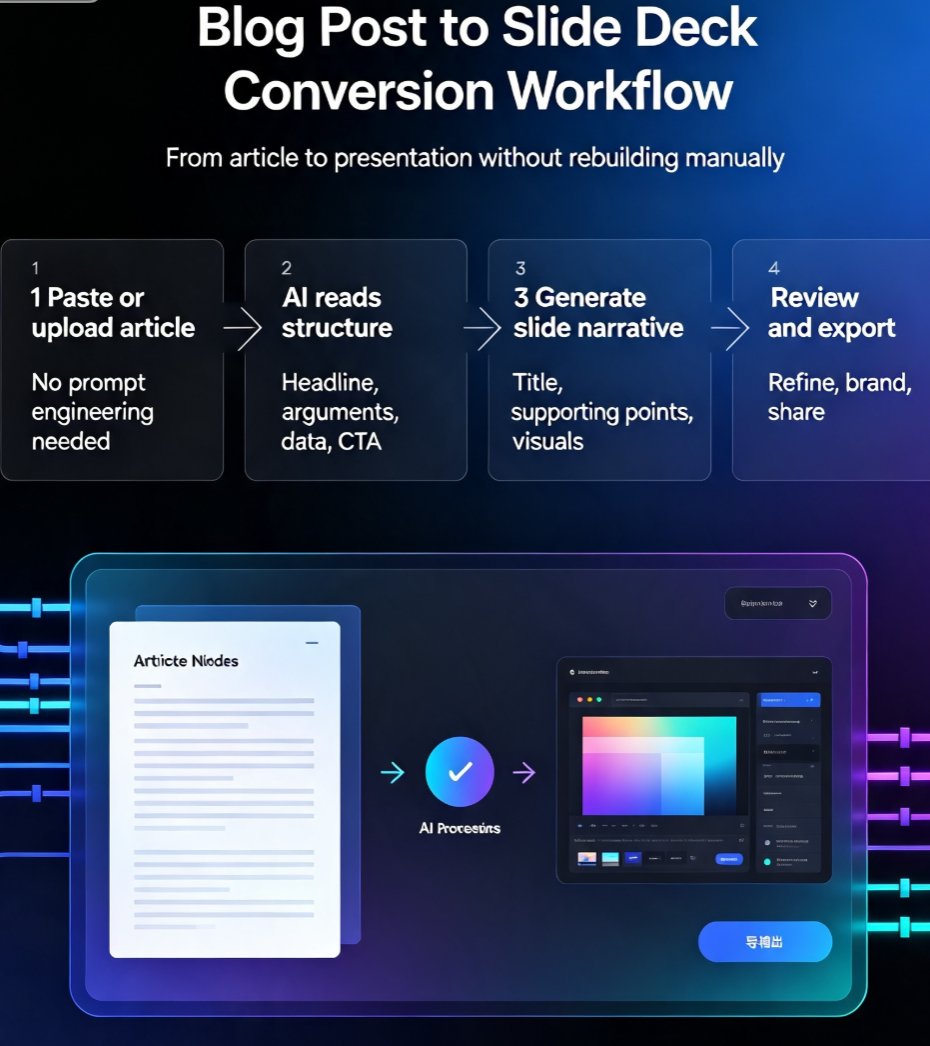
03 Step-by-Step: Turn a Blog Post into a Slide Deck with Zendeck
Let's walk through the actual workflow. It takes about 10 minutes from start to finish.
Step 1: Get Your Content Ready
You can paste your blog post's text directly, import a Word document, or use a PDF. Zendeck accepts Markdown too—handy if you're a developer or write in Notion. If your blog post is long, that's fine. Zendeck handles long-form content without losing the thread.
Step 2: Choose a Template or Brand Kit
If you have a brand kit set up, Zendeck will apply it automatically. If not, pick from the template library—there are premium options for corporate, education, and creative styles. This is where you ensure consistency with your existing materials.
Step 3: Generate and Review
Hit generate, and Zendeck produces a draft deck. You'll see each slide with the extracted content. Review the flow—you can reorder slides, edit text, or swap visuals. The online editor is intuitive; you don't need design skills.
Step 4: Add Narration (Optional)
If you want to turn the deck into a micro-course or a video, Zendeck's PPT-to-video feature lets you add narration. This is a game-changer for training teams or sharing content asynchronously.
Step 5: Export or Share
Export to PPTX, PDF, or Google Slides, or share a link directly from Zendeck. Your team can collaborate in real time, and external clients can view without an account.
The entire process is faster than making coffee. And because Zendeck learns from your brand kit, every deck you create gets more consistent over time.
04 Zendeck vs. Other AI Presentation Tools: A Comparison
To give you a clear picture, here's a comparison of Zendeck with two popular alternatives—Gamma and Canva—specifically for blog-to-slide conversion. This is based on my experience and user feedback, not marketing fluff.
| Feature | Zendeck | Gamma | Canva |
|---|---|---|---|
| Input type | Paste text, Word, PDF, Markdown, URL | Prompt, text, URL | Prompt, text, templates |
| Preserves article structure | Yes—mirrors original logic | Partially—often flattens | No—requires manual restructuring |
| Brand kit enforcement | Yes—automatic via brand kits | Limited—manual styling | Yes—but manual per slide |
| Design control | High—smart layout + templates | Medium—template-based | High—but time-consuming |
| PPT-to-video | Yes—built-in narration | No | No |
| Collaboration | Real-time, with permissions | Real-time | Real-time |
| Best for | Recurring content repurposing | One-off prompt-based decks | Quick visual tweaks |
The takeaway: if you're converting blog posts regularly, Zendeck is the only tool that treats the article as the source of truth. Gamma and Canva are great for other use cases, but they'll make you do the heavy lifting when it comes to repurposing.
05 Tips for Getting the Best Results from Blog-to-Slide Conversion
Even with AI, a little prep goes a long way. Here are some hard-won tips from my own workflow:
- Trim the fluff before you import. Remove intro paragraphs, disclaimers, and anything that's not core to the argument. The AI works better with clean input.
- Use headings and subheadings. If your blog post has a clear hierarchy, Zendeck will respect it. If it's a wall of text, the AI will still extract key points, but you'll have to do more editing.
- Add data visualizations. If your post includes stats, Zendeck can turn them into charts. You can also pull from the asset library for icons and illustrations.
- Review the narrative flow. The AI is smart, but it's not you. Read through the deck and make sure the story arc matches your original intent. Reorder slides if needed.
- Leverage brand kits. If you haven't set one up, do it once and save yourself hours later. Zendeck's brand kit enforces your colors, fonts, and logo across all decks.
One more thing: don't be afraid to use the PPT-to-video feature. Turning a blog post into a narrated micro-course is a fantastic way to repurpose content for different audiences. I've seen trainers and HR teams do this with onboarding materials—it's a huge time-saver.
06 Real-World Use Cases: Who Benefits Most from Blog-to-Slide Conversion
This isn't just for marketers. Here are three scenarios where Zendeck's blog-to-slide conversion shines:
For Content Marketers
You publish a weekly blog post. Now you need a LinkedIn carousel, a webinar deck, or a sales one-pager. Instead of recreating the wheel, you convert the post into a deck, tweak it, and share it. Your content calendar just got a lot more efficient.
For Educators and Trainers
You write detailed lesson notes or research summaries. Turning them into slides for a lecture or an online course is a no-brainer. Zendeck's AI structures the content logically, and you can add narration to create a micro-course. Check out how one HR department automated onboarding presentations with a similar workflow.
For Consultants and Analysts
You produce long reports or case studies. Clients want a concise deck for a meeting. Zendeck extracts the key findings and presents them visually. A consultant I know created a data-rich case study deck in 10 minutes using Zendeck—you can read about that here.
07 The Bottom Line: Stop Copy-Pasting, Start Converting
Blog-to-slide conversion is one of those tasks that seems simple but eats up hours. The manual approach—copying text, resizing boxes, fiddling with fonts—is a productivity killer. And most AI tools don't actually solve the problem because they're not designed for it.
Zendeck is the exception. It's built for content repurposing, so it understands the structure of your article and turns it into a deck that looks like a designer made it. Whether you're a solo blogger or a team producing weekly decks, Zendeck saves you time and keeps your brand consistent.
If you're ready to try it, start with a blog post you've already written. Import it, generate the deck, and see the difference. You'll wonder why you ever did it manually.
FAQ
Can Zendeck convert a blog post directly into a slide deck?
Yes. Zendeck is purpose-built for content repurposing. You can paste the text, import a Word/PDF file, or use a URL (if supported) and Zendeck's AI extracts the key points, builds a narrative structure, and applies design automatically. You don't need to write a prompt—the article itself is the input.
Do I need design skills to use Zendeck for blog-to-slide conversion?
No. Zendeck's smart layout engine handles fonts, colors, and spacing for you. You can also apply a brand kit to keep everything consistent. The output is presentation-ready, and you can tweak it in the online editor if you want.
How does Zendeck compare to tools like Gamma or Canva for this task?
Gamma and Canva are great for generating decks from prompts, but they often require manual tweaking when converting an existing article. Zendeck is designed specifically for document-to-deck workflows—it preserves your article's logic, creates a slide-by-slide narrative, and offers advanced features like brand kits and PPT-to-video, making it a better fit for recurring repurposing.
Can I export the converted deck to PowerPoint or PDF?
Absolutely. Zendeck lets you export your presentation to PPTX, PDF, and Google Slides. So you can convert a blog post into a deck, then share it or further edit it in your preferred tool.