Accessible AI Presentations: WCAG Compliance Is the New Trend
Picture this: you've just finished a pitch deck you're genuinely proud of. The visuals are sharp, the narrative flows, and your client's logo sits on every slide. Then someone on the call says, "Sorry, could you read the chart on slide 14? The colors all look the same to me."
That moment — when a deck silently excludes someone in the room — happens more often than you'd think. And it's exactly why accessibility is becoming the new battleground in presentation design.
01 Why Accessibility Is No Longer Optional
Here's a number that should stop you mid-scroll: over 1.3 billion people worldwide live with some form of disability. That's roughly one in six humans on the planet. When you build a slide deck without thinking about color contrast, alt text, or reading order, you're not just cutting corners — you're actively excluding a significant portion of your audience.
Accessibility standards like WCAG (Web Content Accessibility Guidelines) have been around for years, but they've mostly lived in the world of websites and apps. Presentations? Not so much. That's changing fast. Organizations are starting to treat slide decks with the same compliance rigor as their digital properties. And with AI tools now capable of building entire presentations from a text outline, the question isn't whether your deck meets WCAG — it's whether your tool can make it meet WCAG automatically.
Accessible presentations are no longer optional. Every slide deck you create either includes or excludes a significant portion of your audience.
02 What WCAG Compliance Actually Means for Your Slides
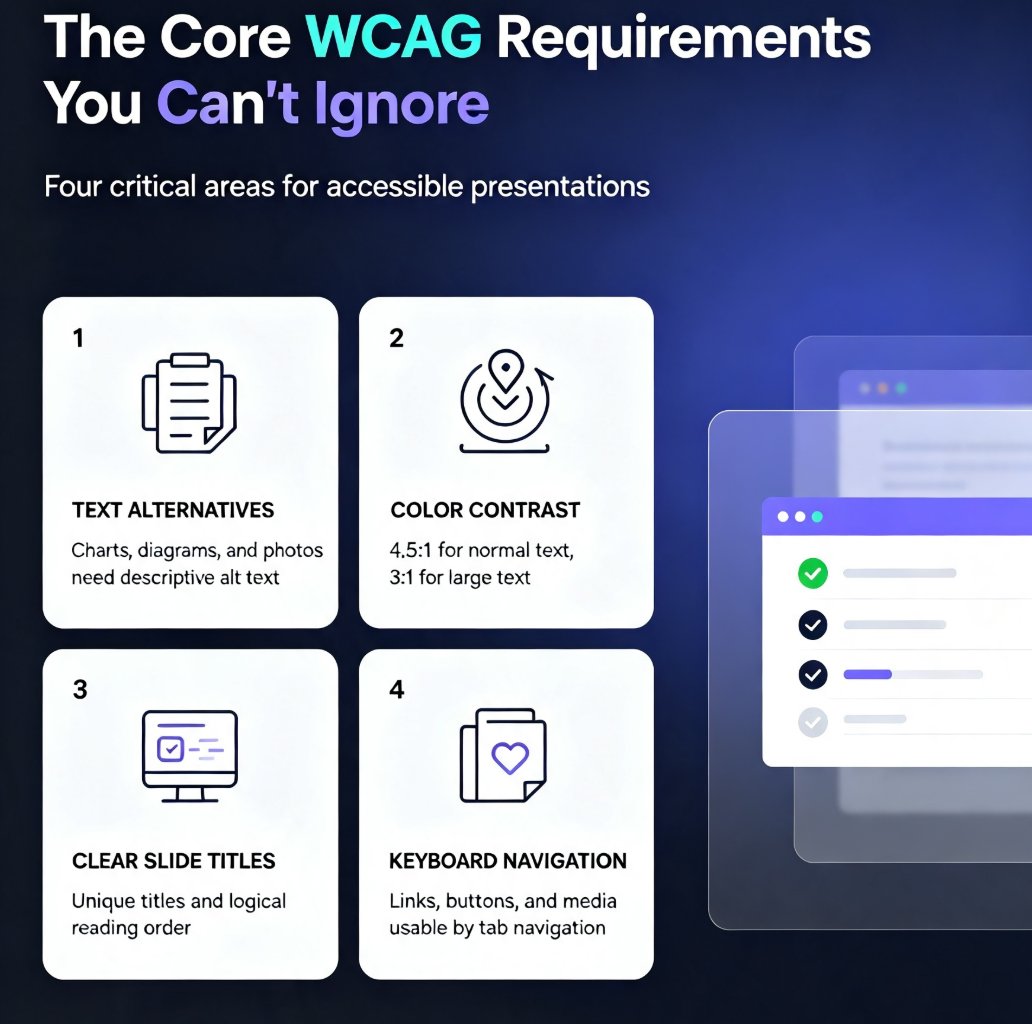
Let's be real: WCAG is a dense document. The full guidelines run hundreds of pages across four principles — perceivable, operable, understandable, and robust. But for presentations, the practical requirements boil down to a handful of things you can actually control.
| WCAG Requirement | What It Means for Slides | Common Failure | AI-Assisted Fix |
|---|---|---|---|
| Color contrast | Text and graphics need sufficient contrast against backgrounds | Light gray text on white backgrounds | AI enforces WCAG contrast ratios automatically |
| Alt text | Every meaningful image needs a descriptive text alternative | Images added without any description | AI generates descriptive alt text for each visual |
| Reading order | Screen readers must navigate slides in a logical sequence | Text boxes placed in the wrong order | AI maintains logical reading order throughout |
| Heading structure | Headings must follow a clear hierarchy | Random font sizes instead of heading levels | AI applies consistent heading styles automatically |
| Text size | Text must be resizable and readable | Tiny fonts crammed into dense slides | AI enforces minimum font sizes by default |
For a deeper dive into how AI handles these requirements in practice, check out our guide on WCAG tips for Zendeck users.
03 The Manual Accessibility Trap
Here's the uncomfortable truth about manual accessibility work: it's tedious, error-prone, and almost always gets deferred. I've watched teams try to retrofit WCAG compliance onto finished decks. It means going slide by slide, checking contrast ratios, writing alt text for every image, reordering text boxes, and redoing heading styles. For a 40-slide deck, that's easily a full day of work — if you remember every guideline. Most people don't.
Even worse, manual accessibility is a one-time fix. The next time someone creates a deck, the same mistakes come back. There's no institutional memory, no guardrails, just the same cycle of "we'll fix it later" — and later never comes.
Manual accessibility work is a trap: it's slow, error-prone, and doesn't scale across your team's decks.
04 How AI Changes the Accessibility Equation
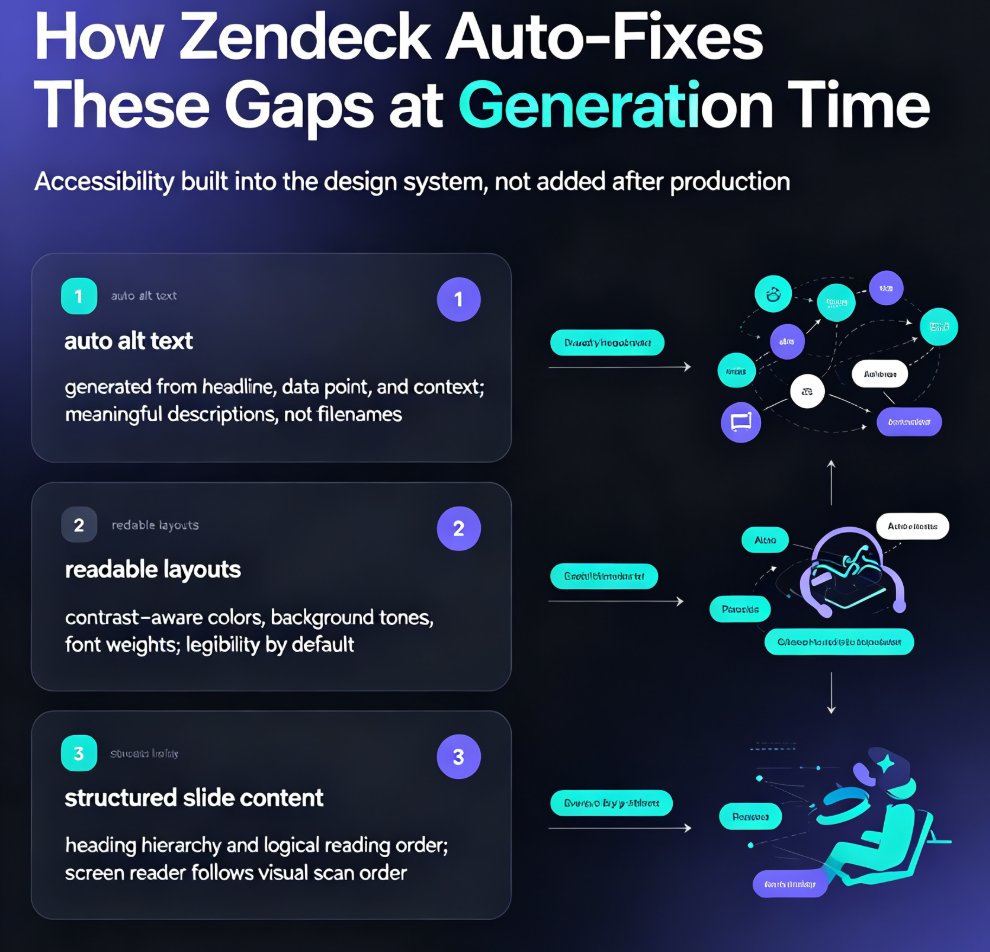
This is where AI-powered presentation tools genuinely shine. Instead of asking a designer to remember every WCAG guideline, the tool itself embeds compliance into the generation process. When you paste a text outline into an AI presentation platform, the system applies accessibility rules as it builds: enforcing contrast ratios, generating alt text for images, maintaining logical reading order, and structuring headings properly.
The data backs this up. Research from 2Slides shows that AI-generated presentations reduce both the cost and the error rate of accessibility compliance dramatically. What used to take a designer hours now happens in the background, automatically, on every single deck.
If you've ever wondered why your AI-generated slides still look off, our piece on fixing messy AI slides covers the common pitfalls — and accessibility is one of the biggest.
05 Building Accessible Decks with Zendeck: A Practical Workflow
Here's what this looks like in practice with Zendeck. The workflow is simple enough that anyone on your team can follow it, regardless of design experience.
Step 1: Start with an accessible template. Choose a template that already meets WCAG contrast and layout requirements. Zendeck's template library includes high-contrast designs with clear heading hierarchies, generous white space, and readable font choices. This eliminates the need to retrofit compliance after the fact.
Step 2: Paste your content as a structured outline. Whether you're working from a Word document, Markdown, or a plain text file, the AI parses your content and applies accessibility rules during generation. This is where the magic happens — the AI handles contrast, alt text, and structure as it builds each slide.
Step 3: Let the AI handle the heavy lifting. The system generates descriptive alt text for images, enforces color contrast ratios, maintains logical reading order, and applies consistent heading styles. You don't need to know WCAG inside and out — the tool does.
Step 4: Review and refine. No AI is perfect. Take a few minutes to review the generated deck, check that alt text reads naturally, and verify that the reading order matches your narrative flow. For teams that need extra consistency, brand kits help maintain visual standards across hundreds of slides.
Step 5: Export and share. Once your deck is ready, export it to PPTX, PDF, or share it online. Accessibility carries through to the final output, so your audience gets the same inclusive experience regardless of how they view it.
06 Measuring the Impact: Beyond Compliance
Accessibility isn't just about checking boxes. When you make your presentations accessible, you make them better for everyone. High-contrast text is easier to read on a projector. Descriptive alt text helps when images fail to load. Logical reading order means your narrative actually flows the way you intended. These aren't compromises — they're upgrades.
Organizations that embrace accessible presentations also reduce legal risk. Accessibility lawsuits are on the rise, and they're not limited to websites anymore. A deck that fails WCAG standards can be a liability, especially in regulated industries like education, healthcare, and government.
Accessible presentations aren't just compliant — they're more effective for every viewer, in every context.
If you're building training or compliance materials, you'll want to check out our guide on creating compliance training decks with AI templates. And for more on how AI handles design consistency, our piece on AI-governed brand consistency with smart templates is worth a read.
The bottom line: accessible AI presentations are the new standard, not a nice-to-have. With the right tools, WCAG compliance becomes a background process rather than a manual chore. You focus on the content; the tool handles the inclusivity. That's a trade worth making.
FAQ
Q: What does WCAG compliance mean for presentations?
A: WCAG (Web Content Accessibility Guidelines) sets standards for making digital content accessible to people with disabilities. For presentations, this means ensuring sufficient color contrast, providing descriptive alt text for images, maintaining logical reading order, and using proper heading structures so screen readers and assistive technologies can navigate your slides effectively.
Q: How do AI tools help with presentation accessibility?
A: AI presentation tools embed accessibility rules directly into the generation process. Instead of manually checking contrast ratios and writing alt text, the AI applies these standards automatically as it builds slides from your content outline. This dramatically reduces both the time and error rate associated with manual accessibility work.
Q: What are the most common accessibility failures in slide decks?
A: The most frequent issues are insufficient color contrast (light text on light backgrounds), missing alt text for images, incorrect reading order for screen readers, and inconsistent heading structures. These problems are easy to miss during manual creation but are automatically handled by AI-powered tools.
Q: Does Zendeck support WCAG-compliant presentation creation?
A: Yes. Zendeck's AI presentation platform applies accessibility rules during slide generation, including contrast enforcement, alt text generation, logical reading order, and consistent heading styles. Combined with accessible templates and brand kits, Zendeck makes it practical to create inclusive decks at scale.
Q: How long does it take to make a presentation accessible with AI?
A: With AI-assisted tools, accessibility is handled during the initial generation process — there's no separate retrofitting step. A 40-slide deck that might take a full day to manually make accessible can be generated with accessibility built in, in a matter of minutes.