Popular Articles

A curated collection of the most-read and editor-picked articles — see what everyone's reading.

402 articles

Brand-Consistent Training Decks: Zendeck Template Library Guide

Courseware Design 2026-08-24 2492

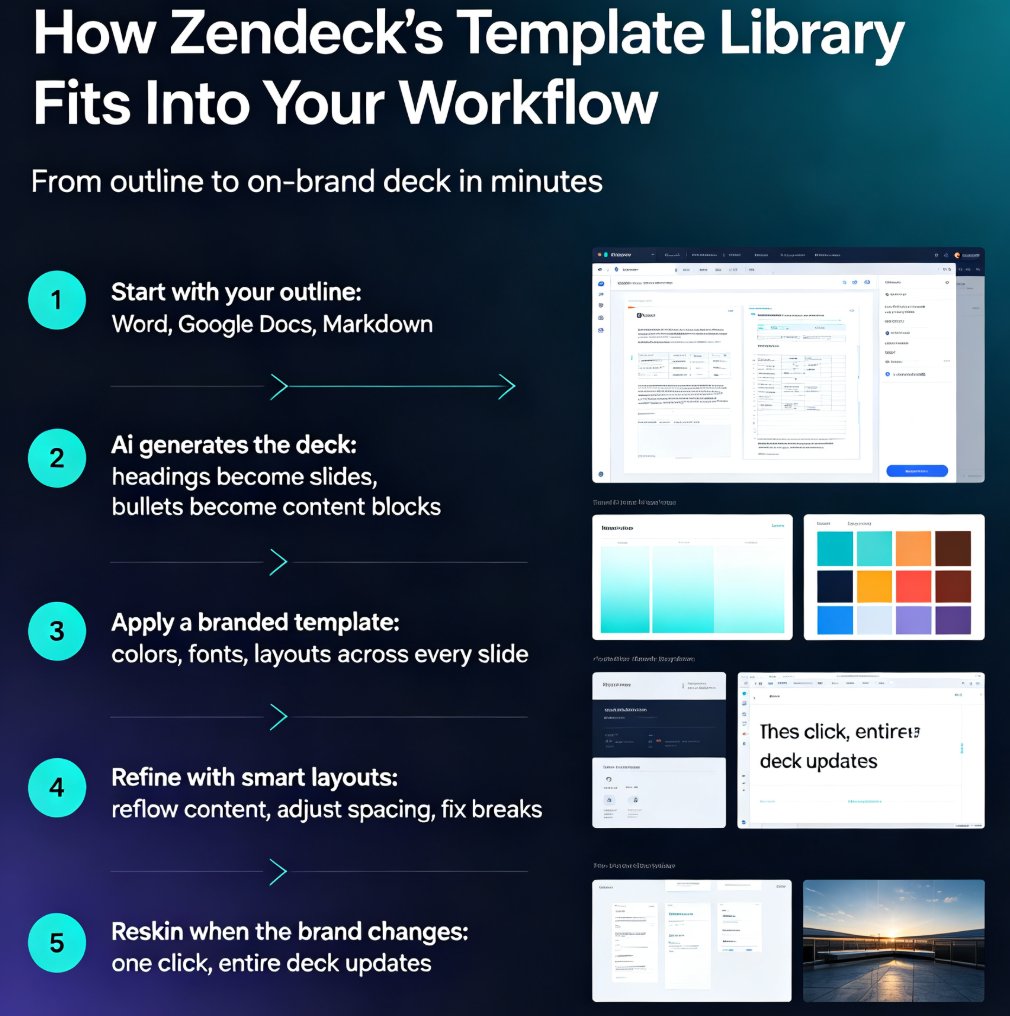
Zendeck's premium template library lets L&D and HR teams build brand-consistent training decks in minutes, no designer required. This guide walks through how to pick branded templates, apply smart layouts, and build a reusable training system that keeps every course on-brand. Stop fighting font sizes and color codes — learn how a template library turns scattered slide decks into a consistent, professional training catalog. Perfect for corporate trainers, L&D managers, and team leaders who need speed without sacrificing polish. We'll cover the real workflow: importing outlines, one-click reskinning, brand kit setup, and scaling consistency across an entire training program. Whether you're building onboarding, compliance, or product training, the same system applies. If your team has ever shipped an off-brand deck, this guide is the fix you've been looking for.

How to Co-Edit a Deck with Your Team in Real Time Using Zendeck

Office Efficiency 2026-08-18 2487

Zendeck's real-time collaboration features let your team co-edit a presentation together without version conflicts or email ping-pong. This step-by-step guide walks you through setting up sharing, managing edit and comment permissions, and keeping every stakeholder aligned in a single source of truth. Whether you're working with internal teammates or external clients, Zendeck's cloud-based co-editing cuts review cycles dramatically and ensures the latest version is always the one everyone sees. Learn the exact workflow our team uses to go from messy file exchanges to smooth, real-time co-authoring — plus the permission settings that prevent accidental edits and the commenting habits that keep feedback actionable. If you've ever lost a slide to a conflicting version, this tutorial is for you.

Zendeck vs Gamma vs Canva: Best AI Presentation Tool for Educators 2026

AI Courseware 2026-09-07 2483

Zendeck vs Gamma vs Canva: best AI presentation tool for educators in 2026. This head-to-head comparison benchmarks all three platforms against a real course-design workflow — Word outline import, AI deck generation, smart layout, brand consistency, and PPT-to-video. Gamma is fast and straightforward; Canva offers maximum design control. But neither converts slides into narrated micro-courses natively. Zendeck is the only tool built for educators that pairs AI deck generation with PPT-to-video export, auto subtitles, and automatic accessibility checks. Backed by 2026 third-party tests and educator community ratings, this review shows which tool actually saves time for course designers, trainers, and L&D teams. Includes benchmark charts, comparison tables, and practical recommendations. Read this before you pick another presentation tool.

Team Slide Collaboration: Edit, Share, and Review Decks in Real Time

Office Efficiency 2026-08-19 2480

Team slide collaboration doesn't have to mean emailing FINAL_v3 back and forth. Zendeck lets your team edit, share, and review presentations in real time — no version chaos, no merging slides, no lost feedback. This guide breaks down how real-time co-editing, link sharing, and in-context comments replace the old email-and-attachment workflow, so your team can finalize decks in hours instead of days. You'll learn how to set permissions, collaborate with external clients, and keep a single source of truth from first draft to final sign-off. If you're tired of hunting for the latest version, this is the workflow you've been missing.

Data-Heavy Slides Made Simple: Research Decks with Zendeck Charts

AI Courseware 2026-08-27 2460

Struggling to turn raw research data into clear, compelling slides? Zendeck's chart and data visualization assets let educators and researchers build professional data-heavy presentations in minutes — no design skills required. This guide walks you through choosing the right chart type, applying smart layouts, and following design principles that make numbers stick. Learn how to replace manual graph formatting with Zendeck's built-in chart library, keep colors consistent with your institution's branding, and create accessible, audience-ready research decks for conferences, classrooms, and stakeholder reports. If you've ever spent hours wrestling with Excel charts and PowerPoint alignment, this is the workflow you've been missing.

5 Smart Layout Tricks to Upgrade Your Presentation Design Instantly

Courseware Design 2026-09-22 2453

Messing with text boxes for hours gets you nowhere. These 5 smart layout tricks will instantly upgrade your presentation design — no design skills needed. See how consistent typography, a limited color palette, disciplined alignment, and a clear content hierarchy transform messy slides into professional decks. Then discover how Zendeck's smart layout and one-click reskin features automate all of it: unify fonts and colors, fix spacing, and refresh an entire deck in a single click. Includes a practical comparison of manual formatting versus AI-driven layout, with time-saving estimates for educators, trainers, and busy team leads. You'll also learn which formatting habits to drop and the honest caveats worth knowing before you reskin a 60-slide course and send it to your manager.