How to Create Standardized Training Decks for HR Teams with Zendeck
Let's be honest: if you're in HR or L&D, you've probably spent way too many hours fixing misaligned text boxes, hunting for the right logo, and begging colleagues to use the correct font. Training decks multiply fast—onboarding, compliance, leadership, safety—and each one seems to have its own style. The result? A patchwork of presentations that look like they came from different companies.
But here's the thing: standardized training decks aren't just about looks—they're about learning outcomes. When every slide follows the same structure, learners know where to look, what to expect, and how to absorb the content. And when you can produce those decks in hours instead of days, your team can focus on what actually matters: the training itself.
That's where Zendeck comes in. It's an AI-powered presentation platform built for people who don't have design skills—and for teams that need to scale content without losing brand consistency. Let's walk through how you can use Zendeck to create standardized training decks for your HR team, from outline to final export.
I. Why Standardization Matters for HR Training Decks
Think about the last time you opened a training deck from a different department. Different fonts, mismatched colors, logos stretched or pixelated. It doesn't just look unprofessional—it undermines trust. Employees notice. They might even question the credibility of the content.
The pain point is real: inconsistent decks lead to confused learners, longer review cycles, and a diluted brand. When your HR team has to manually adjust every slide, you're not just wasting time—you're introducing errors. Version control becomes a nightmare. Someone updates the policy, but the old deck stays in circulation.
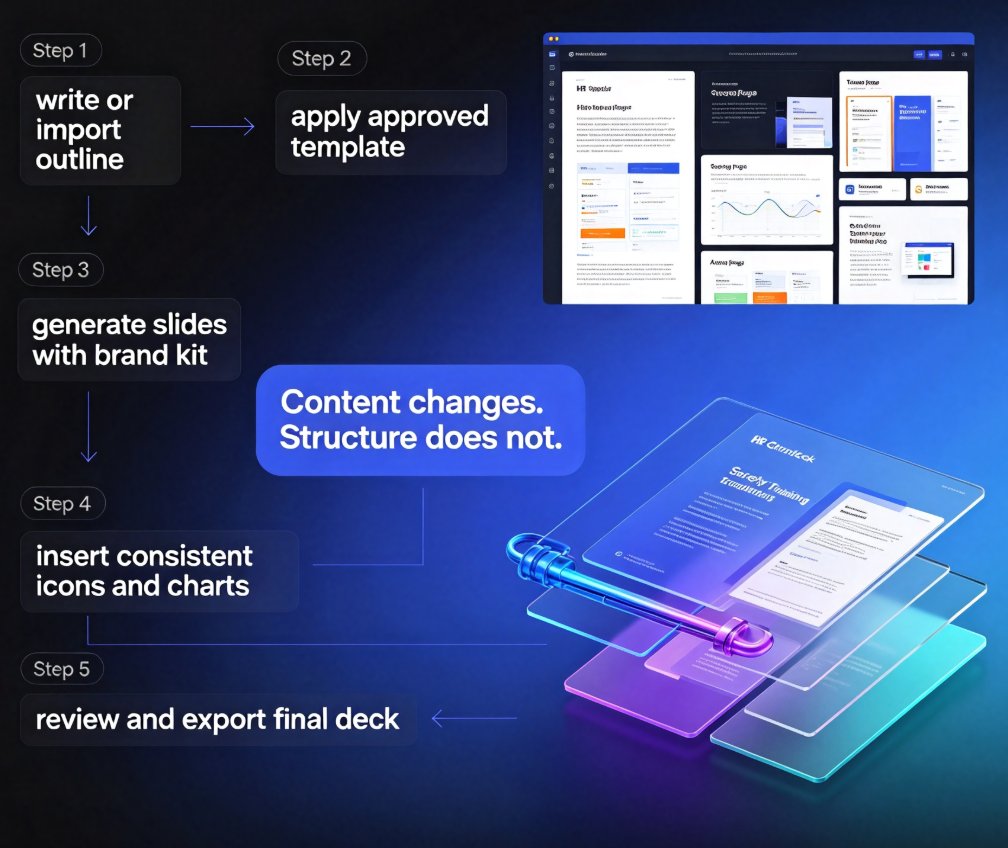
Now imagine the opposite. Every training deck—whether it's for new hires, compliance refreshers, or manager workshops—uses the same template. The same color palette, the same typography, the same icon style. The content changes, but the structure doesn't. That's what standardization looks like, and it's achievable with the right tools.
Zendeck solves this by giving you a central place to manage templates, brand kits, and assets. You don't need to be a designer to enforce consistency—the platform does it for you.
II. The Zendeck Workflow: From Outline to On-Brand Deck
Let's get practical. Here's how you can build a standardized training deck in Zendeck, step by step.
1. Start with an Outline
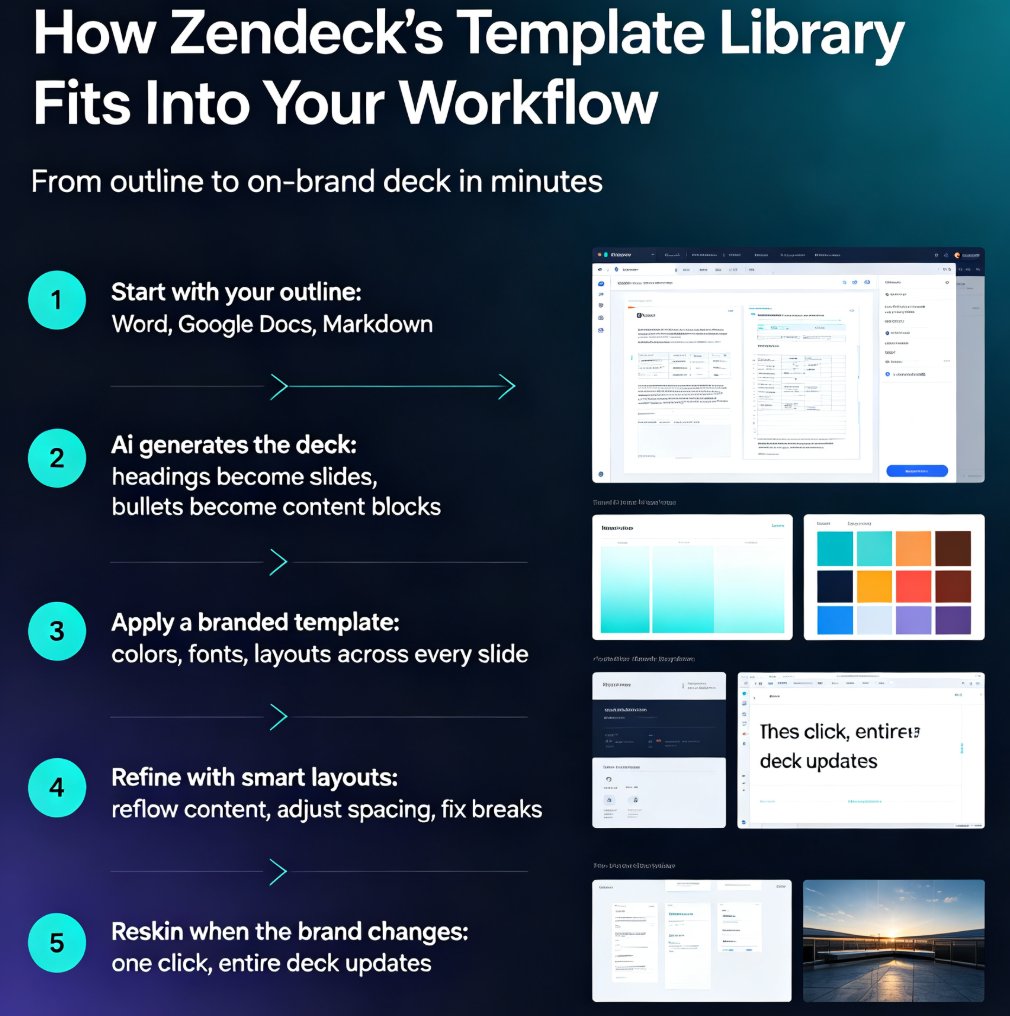
You probably already have training content in Word, Google Docs, or even a rough Markdown file. Zendeck lets you import that directly. Upload a Word outline or paste your text, and the AI will structure it into slides. This is a huge time-saver because you don't have to manually copy-paste each section.
2. Choose a Template That Matches Your Brand
Zendeck's template library is designed for different use cases—including training. You can pick a template that aligns with your corporate style, or you can create a custom brand kit. The key is to choose once and reuse. Once you've selected a template, every future deck can start from that same foundation.
3. Let AI Generate the Slides
After you've set the template, Zendeck's AI takes over. It generates structured slides with headings, bullet points, and even suggested visuals. You don't have to worry about layout—the platform handles it. This is where the magic happens: you go from a text outline to a complete deck in minutes.
4. Review and Refine
AI isn't perfect, and you'll want to review the content. But the beauty is that the design is already consistent. You can tweak wording, add specific examples, or adjust the flow without breaking the visual harmony. Zendeck's smart layout keeps everything aligned, so you're not fighting with text boxes.
5. Export or Convert to Video
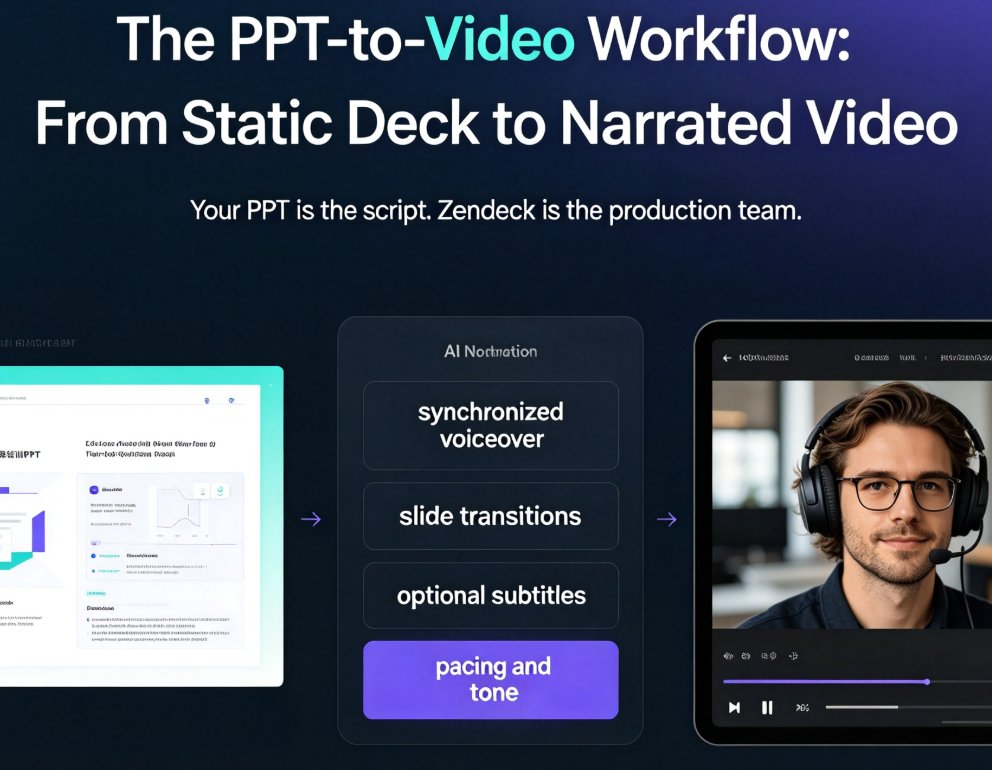
Once your deck is ready, you can export it as PPT, PDF, or even turn it into a narrated video using Zendeck's PPT-to-video feature. That's especially useful for e-learning modules that need to be delivered consistently across locations.
III. One-Click Reskin: The Secret to Batch Consistency
Here's a scenario: you've created a master training deck for onboarding. Now you need to adapt it for different departments—sales, engineering, customer support. The content is 80% the same, but you want each version to feel tailored.
Without a tool, you'd copy the deck, then manually change colors, fonts, and images. That's hours of work. With Zendeck, you use one-click reskin. You apply a different theme or brand kit to the entire deck instantly. The layout stays intact, but the visual identity shifts.
This is a game-changer for batch production. One-click reskin lets you produce multiple versions of a training deck without ever breaking the underlying structure. You can create a base deck, then reskin it for different audiences, regions, or even seasonal campaigns—all while maintaining consistency.
IV. Reusable Assets and Brand Kits: Keep Every Deck On-Brand
Standardization isn't just about templates—it's about the assets you use. Icons, charts, illustrations, logos. If everyone on your team is pulling from different sources, you'll end up with visual chaos.
Zendeck's asset library solves this. You can store approved icons, charts, and illustrations that align with your brand. When you're building a deck, you pull from this library instead of scouring the internet. This ensures every visual element matches your corporate style.
And if you want to go a step further, create a custom brand kit. Zendeck lets you define your colors, fonts, and logo placement. Once saved, every deck you create with that brand kit automatically uses those elements. No more manual adjustments.
The result: every training deck looks like it came from the same design team—because it did.
V. Scaling Production: Templates, Collaboration, and Version Control
When you're producing training decks at scale, collaboration becomes critical. You can't have three people editing the same file and then merging changes manually. Zendeck offers online editing and link sharing, so your HR team can work together in real time.
You can also set up a repository of approved templates. Instead of starting from a blank canvas, team members pick from a curated list. This reduces the risk of someone going rogue with a random design. And because everything is stored in the cloud, you always have the latest version.
Standardization isn't about restricting creativity—it's about removing friction. When your team has clear guardrails, they can focus on content quality instead of design decisions.
VI. Manual vs. Zendeck: A Side-by-Side Comparison
Let's put the numbers into perspective. Here's a typical comparison between manual deck creation and using Zendeck for a batch of five training decks.
| Task | Manual Process | Zendeck Process | Time Saved |
|---|---|---|---|
| Creating a new deck from scratch | 4–6 hours per deck | 30–60 minutes per deck | 75–85% |
| Applying brand colors and fonts | 1–2 hours per deck | Instant (one-click reskin) | ~100% |
| Sourcing icons and visuals | 1–2 hours per deck | 5–10 minutes from asset library | 80–90% |
| Ensuring consistency across decks | Constant manual checks | Built-in template enforcement | ~100% |
| Review and approval cycles | 2–3 days per batch | 1 day per batch | 50–60% |
| Total for 5 decks | 20–30 hours | 3–5 hours | ~85% |
These numbers aren't pulled from thin air—they reflect what HR teams typically experience when they move from manual formatting to an AI-powered workflow. The exact savings depend on your content complexity, but the trend is clear: Zendeck cuts deck production time from days to a few hours.
VII. Tips for Getting the Most Out of Zendeck
Here are a few things I've learned from working with teams that successfully standardized their training decks:
- Invest time upfront in your brand kit. The more detailed your brand kit, the less you'll need to tweak later. Include your logo variations, color hex codes, and font pairings.
- Create a template for each training type. Onboarding, compliance, and leadership development have different structures. Build a template for each, then reuse them.
- Use the asset library consistently. Encourage your team to upload approved visuals. The more assets you have, the faster you'll build decks.
- Take advantage of the AI-generated speaker notes. Zendeck can generate notes that help trainers deliver consistently, even if they're new to the material.
- Don't forget about accessibility. Standardization also means making your decks accessible. Zendeck's alt-text features can help you meet WCAG standards without extra effort.
And if you're worried about AI-generated slides looking messy, check out Why Your AI-Generated Slides Still Look Messy and How Zendeck Fixes It for common pitfalls and solutions.
VIII. From Standardization to Impact
Standardized training decks aren't just a nice-to-have—they're a strategic advantage. When your HR team can produce consistent, on-brand materials quickly, you can respond to training needs faster. New hire onboarding? Done in a day. Compliance update? Rolled out by Friday.
Zendeck makes this possible by combining AI generation, smart templates, and a centralized asset library. You don't need to be a designer or a tech wizard. You just need to set up your brand kit once, and let the platform handle the rest.
So if you're tired of the formatting chaos, give Zendeck a try. Start with one training deck, see how fast it goes, and then imagine what you could do with all that saved time. Your learners will notice the difference—and so will your stakeholders.
For more ideas on boosting team productivity with AI presentation tools, check out 5 Hidden Features of AI Presentation Tools That Boost Team Productivity. And if you want to dive deeper into creating a custom brand kit, read 5 Ways to Create a Custom Brand Kit in Zendeck for Consistent Decks.
FAQ
Q: How does Zendeck help HR teams standardize training decks?
A: Zendeck provides reusable templates, a one-click reskin feature, and a shared asset library. You can create a brand kit once, then apply it to any deck instantly. This ensures every training slide matches your corporate colors, fonts, and layout—no manual formatting needed.
Q: Can I import my existing Word outline into Zendeck?
A: Yes. Zendeck lets you upload a Word outline or paste Markdown/TXT content. It automatically generates a structured, visually consistent deck from your text, so you don't have to start from scratch or copy-paste slide by slide.
Q: What is one-click reskin and why is it useful for batch production?
A: One-click reskin instantly applies a new theme—colors, fonts, and layout—to an entire deck. When you're producing multiple training modules, you can create one master deck, then reskin it for different departments or audiences without breaking the design consistency.
Q: Does Zendeck support collaboration among HR team members?
A: Absolutely. Zendeck offers online editing and link sharing, so multiple team members can work on the same deck simultaneously. You can also store approved templates and assets in the library, making it easy for everyone to stay on-brand.
Q: Can I turn a standardized training deck into a video for e-learning?
A: Yes. Zendeck's PPT-to-video feature converts static slides into narrated micro-courses. This is perfect for HR teams that need to deliver consistent training across remote or distributed teams without losing the standardized look.
Ready to standardize your training decks? Explore Zendeck's office efficiency resources for more tips, or start building your first deck today.