Data Transparency in AI Presentation Tools: 2026 Security Trends
Let's be honest — when was the last time you actually read a privacy policy before pasting a confidential deck outline into an AI presentation tool? If you're like most of us, the answer is "never," and that's exactly the problem.
Here's the uncomfortable truth: in 2026, data transparency has become the single most important buying criterion for AI presentation tools — ahead of design quality, template variety, and even price. Teams are getting burned by consumer-grade tools that quietly use their content for model training, and the fallout is expensive: leaked strategy documents, compliance violations, and trust destroyed with clients.
The good news? The market has responded. As of 2026, AI presentation tools fall into three distinct security tiers, and knowing which tier you're in — and which one you actually need — is the difference between a smooth rollout and a compliance nightmare.
I. Why Data Transparency Became the #1 Buying Criterion in 2026
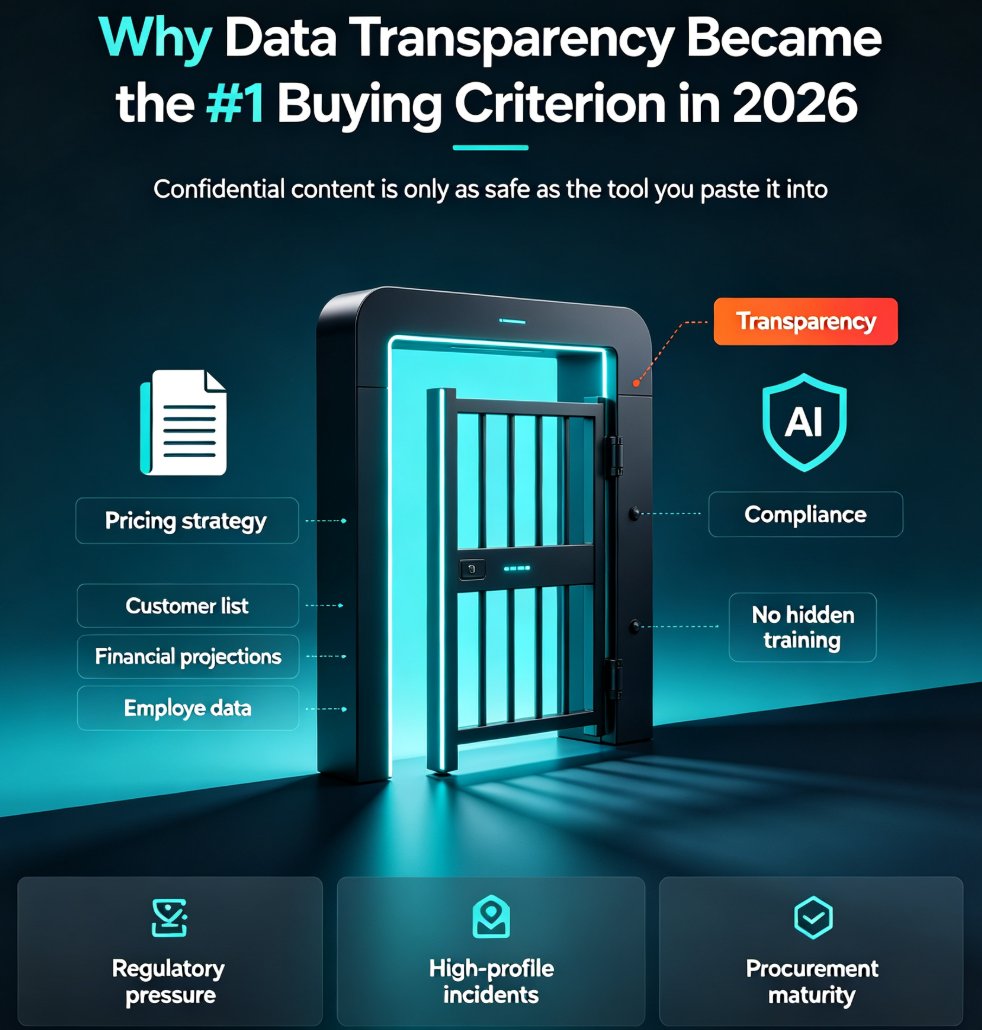
The pain point is real: your confidential content is only as safe as the tool you paste it into.
Think about what actually goes into a presentation. Sales decks contain pricing strategies and customer lists. Training materials contain employee data and internal processes. Pitch decks contain financial projections that haven't been made public yet. When you paste that content into an AI tool, you're not just asking it to design slides — you're handing over your organization's most sensitive information.
The shift happened for three reasons:
-
Regulatory pressure. The EU AI Act, GDPR, and NIST cybersecurity frameworks now explicitly require privacy, accountability, and transparency in AI operations. Companies that can't demonstrate compliance face legal and financial penalties — not to mention reputational damage.
-
High-profile incidents. A steady stream of stories about AI tools training on user content has made procurement teams paranoid. And rightly so.
-
Procurement maturity. Enterprise buyers now have standardized vendor intake forms that include security questionnaires. If a tool can't answer basic questions about data retention and training, it's out of the running.
The outcome: transparency is no longer a nice-to-have — it's a gating criterion. If a tool can't tell you exactly what happens to your data, it doesn't matter how good its templates are. For a deeper look at how the broader security landscape is shifting, check out our breakdown of 2026 data security trends in AI presentation tools.
II. The Three Security Tiers of AI Presentation Tools
As of 2026, the market has sorted itself into three clear tiers. Understanding them will save you from the most common mistake teams make: treating a consumer tool as enterprise-safe because it looked fine in a demo.
| Security Feature | Tier 1: Consumer | Tier 2: Business | Tier 3: Enterprise |
|---|---|---|---|
| Content used for AI training | Yes, by default | No (with privacy controls) | No (contractually guaranteed) |
| SOC 2 Type II certification | No | Yes | Yes |
| SSO / SAML | No | Optional | Required |
| Audit logs | No | No | Yes |
| Data residency options | No | Limited | Yes (EU, US, etc.) |
| No-retention modes | No | No | Yes |
| Signed DPA / BAA | No | DPA only | DPA + BAA available |
| Best for | Personal use, throwaway decks | Marketing, internal training, sales enablement | IT, finance, legal, healthcare, defense |
Here's what that looks like visually:
The honest shortcut: never paste confidential data into a free consumer AI tool. For most enterprise teams in 2026, a business-tier tool with SOC 2 Type II and no-training commitments is the minimum bar. Regulated industries — healthcare, finance, defense — need enterprise-tier controls with signed BAAs or private deployments.
III. What "Transparency" Actually Means in Practice
Transparency sounds good in theory, but what does it actually look like in a vendor's documentation? Here's the eight-item checklist that procurement teams are using in 2026:
- Training policy. Does the vendor use your content to train AI models? On which plans?
- Data retention. How long is your content stored after you delete it? Is there a no-retention mode?
- Encryption. Is data encrypted in transit and at rest? What standard?
- Certifications. SOC 2 Type II? ISO 27001? GDPR compliance?
- Subprocessors. Who else touches your data? (Cloud providers, AI model providers, etc.)
- Access controls. Can you enforce SSO? Are there audit logs?
- Data residency. Can you choose where your data is stored?
- Deletion process. What happens when you cancel? Can you get a certified deletion?
If a vendor can't answer all eight questions in writing, that's a red flag. The risk is rarely the slide tool itself — it's usually the data handling practices around it. For a broader view of what users should expect from AI presentation tools on this front, read our piece on AI transparency in presentation tools.
IV. The Compliance Landscape: SOC 2, GDPR, HIPAA, and the EU AI Act
Let's talk about the alphabet soup of compliance, because it matters more than you think.
SOC 2 Type II has become the baseline for business-tier AI tools. It means an independent auditor verified that the vendor's security controls actually work over time — not just on paper.
GDPR governs how EU citizens' data is handled, and it has teeth. Fines can reach 4% of global annual revenue. If your organization operates in the EU or serves EU customers, your AI presentation tool needs to be GDPR-compliant.
HIPAA is where things get tricky. Here's a specific example from the research: Microsoft 365 Copilot is covered under Microsoft's enterprise BAA for eligible HIPAA services. But for most other AI presentation tools, HIPAA coverage is not publicly stated and must be negotiated via enterprise sales with an explicit BAA. Never assume — always get the BAA signed before sending protected health information (PHI).
The EU AI Act adds another layer. It classifies AI systems by risk level and requires transparency and accountability for high-risk applications. Presentation tools that handle sensitive content are increasingly being evaluated under this framework.
The outcome: compliance isn't just a checkbox — it's a competitive advantage. Tools that can demonstrate compliance win enterprise deals. Tools that can't, don't. And when trust is on the line, that's exactly why transparency in presentations matters in 2026.
V. How to Evaluate a Tool Before You Paste Confidential Content
Here's a practical workflow you can use the next time you're evaluating an AI presentation tool:
Step 1: Ask the hard questions upfront. Before you even sign up, send the vendor the eight-item checklist from Section III. If they can't answer in writing, move on.
Step 2: Check the privacy policy for your specific plan. Here's a real example: 2Slides' privacy policy (last updated March 17, 2026) states that content and usage data are used to improve AI models on free usage, but on paid plans with privacy controls enabled, content is not used for AI training. Notice the nuance — it depends on the plan. Always check your plan, not just the tool's general policy.
Step 3: Match the tier to your use case. Marketing, internal training, and sales enablement teams can safely use business-tier tools with SOC 2 Type II and no-training commitments. Enterprise IT, finance, and legal teams should require Tier 3 controls: SSO, audit logs, EU data residency where applicable, and a signed DPA. Healthcare, defense, and regulated finance need enterprise contracts with explicit BAAs or private deployments.
Step 4: Write it into your vendor intake form. The worst outcome is the middle path — treating a consumer tool as enterprise-safe because it looked fine in a demo. Do the eight-item checklist once, write it into your vendor intake form, and the rest is repeatable.
VI. What Zendeck Does Differently
So where does Zendeck fit into this landscape? Let's be direct about it.
Zendeck is built as a privacy-first platform for educators, trainers, and enterprise teams. The architecture is designed around the principle that your content is yours — it shouldn't be silently repurposed to train someone else's models. For teams that need to handle sensitive educational or corporate content, that distinction matters.
What that means in practice:
- Your deck content stays within your workspace, not fed into a shared training pool by default.
- The platform is designed for the business-tier and enterprise-tier use cases we discussed — teams that need consistent, on-brand presentations without compromising on data handling.
- For educators handling student data and trainers working with internal corporate materials, Zendeck's approach aligns with the transparency expectations that 2026 procurement teams now demand.
That's not a claim that Zendeck replaces a full enterprise compliance stack — if you're in healthcare or defense, you still need to do your own due diligence and get the right agreements signed. But for the vast majority of teams creating training decks, courseware, and internal presentations, Zendeck's privacy-first approach removes the biggest objection teams have to AI presentation tools: "what happens to my content?"
VII. The Bottom Line for 2026
Data transparency in AI presentation tools isn't a trend — it's the new baseline. Teams that evaluate tools through a security-first lens will avoid compliance headaches, protect client trust, and actually move faster because they're not constantly second-guessing what they can and can't paste into a tool.
The three-tier framework gives you a mental model. The eight-item checklist gives you a process. And the compliance landscape tells you what's at stake.
Your move: the next time someone on your team suggests a free AI presentation tool for a confidential deck, you know exactly what to ask. And if they push back, you have the receipts. For more on building secure, on-brand decks with AI, explore our AI courseware hub.
FAQ
Q: Are AI presentation tools safe for confidential data in 2026?
It depends entirely on the tool and the data. Consumer-tier tools may use your content for training and are unsafe for confidential data by default. Business-tier tools with SOC 2 Type II and no-training commitments are acceptable for most internal data. Enterprise-tier tools with SSO, audit logs, data residency options, and no-retention modes are required for regulated industries like healthcare and finance.
Q: What does "no-training commitment" mean in an AI presentation tool?
It means the vendor contractually agrees not to use your content to train or improve their AI models. This is typically available on paid business and enterprise plans, not on free tiers. Always verify this in the privacy policy for your specific plan, as policies can differ between free and paid usage.
Q: Which AI presentation tools are HIPAA-compliant?
Microsoft 365 Copilot is covered under Microsoft's enterprise BAA for eligible HIPAA services. For most other AI presentation tools, HIPAA coverage is not publicly stated and must be negotiated via enterprise sales with an explicit BAA. Never assume — always get the BAA signed before sending protected health information.
Q: What's the difference between SOC 2 Type I and SOC 2 Type II?
SOC 2 Type I verifies that a vendor's security controls are designed correctly at a point in time. SOC 2 Type II verifies that those controls actually operated effectively over a period, typically 6–12 months. For AI presentation tools, SOC 2 Type II is the stronger and more meaningful certification.
Q: How can I check if an AI presentation tool trains on my data?
Check the privacy policy for your specific plan, not just the general policy. Look for language about "training," "improving models," or "usage data." If the policy is vague or the vendor can't answer in writing, treat it as a red flag. The eight-item checklist in this article covers all the key questions to ask.