Make Your Micro-Courses SCORM-Ready: Zendeck's LMS Integration Guide
You spent hours building a sharp micro-course. You exported it, uploaded it to your LMS, and... nothing. No progress tracking, no quiz scores, no completion records. Sound familiar?
The problem isn't your content. It's the format. Most AI presentation tools hand you a beautiful deck and call it a day — but your LMS can't read it. That's where SCORM comes in.
I. What SCORM Actually Is (And Why Your LMS Demands It)
SCORM stands for Sharable Content Object Reference Model. It's not a file format like PDF or MP4 — it's a communication standard that lets course content and a learning management system talk to each other.
SCORM is the bridge that turns a static deck into trackable training.
When you upload a SCORM package to a compliant LMS, the system can track:
- Learner progress (how far through the course someone got)
- Quiz scores and assessment results
- Time spent on each module
- Completion status
The LearnWorlds team puts it plainly: "The LMS can then track learner progress, scores, time spent, and completions consistently, no matter which platform is being used."
That consistency is the whole point. Build once, deploy anywhere.
II. The Two Halves of Every SCORM Package
Before we get into packaging, let's demystify what's actually inside a SCORM file. Articulate's explainer breaks it into two parts:
Content packaging — your course files are bundled into a single .zip file. Inside, there's a key file called imsmanifest.xml. Think of it as the table of contents: it tells the LMS what's in the course, how it's structured, and how to launch it.
Runtime communication — when a learner opens the course, SCORM uses JavaScript API calls to talk to the LMS in real time. That's how the system knows someone finished module 3 or scored 82% on the final quiz.
So a SCORM-compliant course isn't just a file. It's a file plus a conversation.
III. Why AI-Generated Micro-Courses Need SCORM Packaging
Here's the uncomfortable truth about AI presentation tools: most of them stop at "pretty slides." You generate a deck, export a PDF, and upload it to your LMS — and the LMS treats it like a static document. No tracking, no grades, no completion data.
That defeats the purpose of micro-learning. If you can't measure whether people actually completed the training, you're flying blind.
The gap isn't in content creation — it's in content delivery.
This is exactly where Zendeck changes the game. Zendeck doesn't just generate visually consistent slides from your outline; it's built for the full training workflow. You can turn a Word outline into a structured deck, add narration, and even convert slides into video micro-courses. But the missing piece for many teams is LMS compatibility — and that's what SCORM packaging solves.
Let's be real: your training team doesn't want to rebuild content for every platform. You want to create once and deploy everywhere. SCORM makes that possible.
IV. How to Package Your Zendeck Micro-Course for SCORM
Here's the practical part. The exact workflow depends on your toolchain, but the pattern is consistent:
Step 1: Build your micro-course in Zendeck.
Start with your outline — paste Markdown or upload a Word document. Zendeck generates a structured, on-brand deck. Add narration if you want a video-style micro-course. 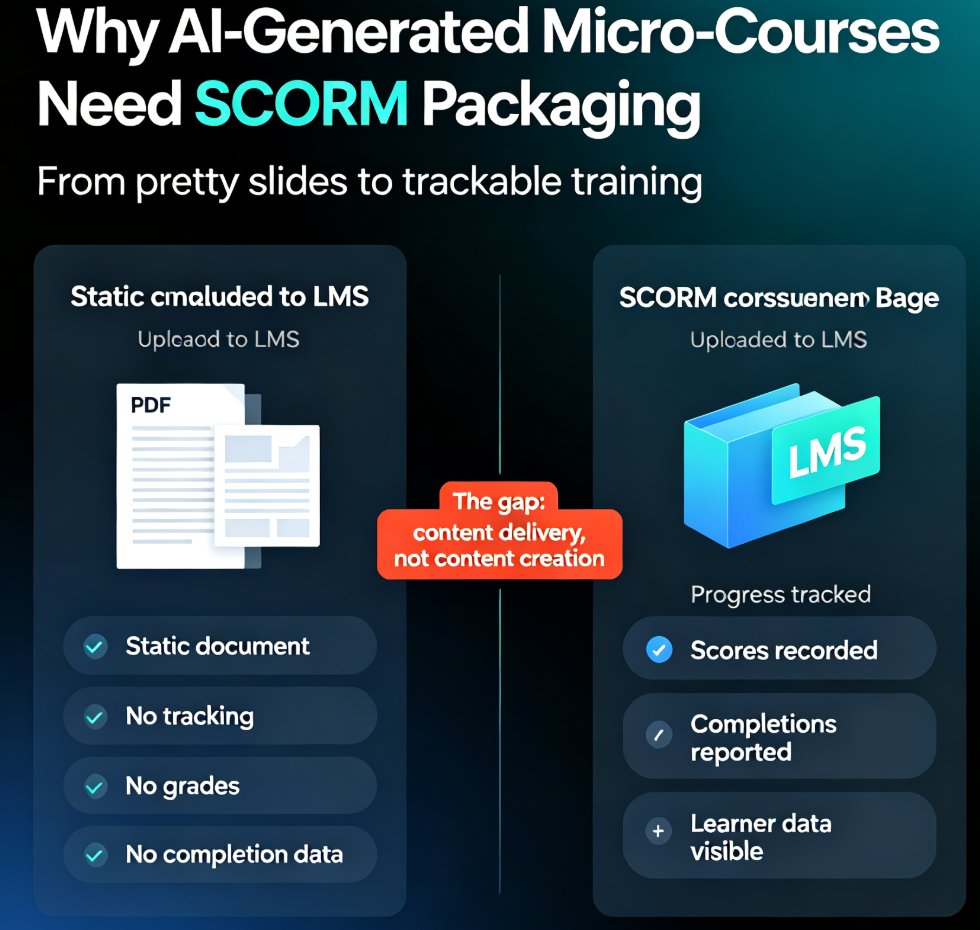
Step 2: Export your content.
Export your finished deck in a format that can feed into a SCORM authoring tool. Most teams export slides or video, then import them into an authoring tool that wraps them in SCORM. If you're building narrated micro-courses, Zendeck's PPT-to-video workflow gives you a solid starting point before packaging.
Step 3: Wrap it in a SCORM package.
Use a SCORM authoring tool to import your Zendeck content, define the quiz questions and completion criteria, and export a .zip package. The tool generates the imsmanifest.xml file and the JavaScript communication layer for you.
Step 4: Upload to your LMS.
Log into your SCORM-compliant LMS, upload the .zip, and launch it. The LMS will now track progress, scores, and completions automatically.
Step 5: Verify the tracking.
Run a test enrollment. Complete the course as a learner, check that your progress and score appear in the LMS reports. If they don't, you've got a configuration issue — usually a version mismatch (more on that below).
V. SCORM 1.2 vs 2004: Which Should You Choose?
This is the question every training manager asks eventually. Here's the honest breakdown:
| Feature | SCORM 1.2 | SCORM 2004 |
|---|---|---|
| Release year | 2001 | 2004 (4th edition: 2009) |
| Completion tracking | Basic | Advanced (sequencing rules) |
| Sequencing | Limited | Full sequencing and prerequisites |
| Quiz score reporting | Yes | Yes, with more detail |
| LMS compatibility | Widest | Broad, but some older LMSs lack it |
| Best for | Simple, linear courses | Complex, branched learning paths |
If your micro-courses are linear — watch a video, take a quiz, done — SCORM 1.2 is the safest bet. It's supported by virtually every LMS on the market.
If you're building branched scenarios or prerequisite-based learning paths, SCORM 2004 gives you the sequencing power you need. Just confirm your LMS actually supports it first — some older platforms don't. If you're curious about building those interactive, branched experiences, our guide on branching scenarios in AI presentations walks through the design side.
VI. SCORM vs xAPI: Should You Care?
You might have heard about xAPI (Experience API) and wondered if SCORM is outdated. Here's the short version: SCORM is still the default for most corporate LMS platforms because it's simple, widely supported, and does exactly what training teams need — track completion and scores.
xAPI goes further by tracking learning experiences outside the LMS — mobile apps, simulations, real-world performance. But it requires a Learning Record Store (LRS) and more technical setup.
For most micro-course teams, SCORM is the pragmatic choice. It works with the LMS you already have, and it covers the metrics that matter: did they finish, how did they score, how long did it take. Don't over-engineer your training stack until those basics are solid.
VII. Common SCORM Pitfalls (And How to Dodge Them)
Pitfall 1: Version mismatch.
You package in SCORM 2004 but your LMS only speaks 1.2. Result: the course won't launch. Check your LMS's supported versions before you package.
Pitfall 2: Missing completion criteria.
If your SCORM package doesn't define what "complete" means, the LMS may never mark anyone as finished. Define completion rules in your authoring tool — typically "view all slides" or "pass the quiz."
Pitfall 3: Overweight packages.
Video-heavy micro-courses can balloon into huge .zip files that time out on upload. Compress your media or host video externally and reference it.
Pitfall 4: Forgetting the manifest.
The imsmanifest.xml file is non-negotiable. If your authoring tool doesn't generate it, your package won't work. Always use a proper SCORM authoring tool rather than hand-zipping files.
VIII. The Bigger Picture: SCORM as Your Training Foundation
Here's what I want you to take away: SCORM isn't a technical burden — it's the thing that makes your AI-generated micro-courses actually measurable.
When you pair Zendeck's content generation with SCORM packaging, you get the best of both worlds: fast creation and real accountability.
Your team creates micro-courses in minutes, packages them for the LMS, and gets the tracking data that proves training is working. No rebuilding content per platform. No guessing whether anyone finished the course.
And if you're exploring the broader workflow, Zendeck's micro-course production resources can help you build the content foundation before you even think about packaging.
FAQ
Q: What is a SCORM-compliant LMS?
A: A SCORM-compliant LMS can import, launch, and track courses built to the SCORM standard. It reads the course package, launches the content, and receives tracking data like progress, scores, and completion status through runtime communication.
Q: Can I use Zendeck-generated slides directly in my LMS?
A: Zendeck generates the visual content — slides, narration, even video micro-courses. To make that content trackable in your LMS, you'll need to wrap it in a SCORM package using a SCORM authoring tool, then upload the .zip to your LMS.
Q: What's the difference between SCORM 1.2 and SCORM 2004?
A: SCORM 1.2 is older but has the widest LMS support and is ideal for linear courses. SCORM 2004 adds advanced sequencing, prerequisites, and more detailed reporting, but requires a newer LMS. Choose based on your course structure and LMS capabilities.
Q: What does imsmanifest.xml do?
A: It's the "table of contents" inside a SCORM package. It tells the LMS what files are in the course, how they're structured, and how to launch them. Without it, the LMS can't read your package.
Q: Do I need to rebuild my course for every LMS?
A: No. That's the whole point of SCORM. A properly packaged SCORM course can be uploaded to any SCORM-compliant LMS without rebuilding — build once, deploy everywhere.