Turn a Training Manual into a Micro-Course with Zendeck's PPT-to-Video
Let's be real: your training manual is probably putting people to sleep. You've spent weeks writing it, but when new hires open that 40-page PDF, their eyes glaze over. Completion rates tank, and you're left wondering if anyone actually learned anything. The fix isn't more text—it's turning that manual into a video micro-course. And with Zendeck's PPT-to-Video, you can do it in minutes, not days.
01 Why Your Training Manual Is Failing Your Team
You know the scene. A new employee gets a link to a 60-slide PowerPoint deck or a dense Word doc. They skim it, maybe watch a few bullet points, and then close it. Text-heavy training materials have a completion rate of around 20-30%—most learners simply don't finish them. Videos, on the other hand, keep people engaged. According to industry studies, video-based training boosts retention by up to 65% compared to text-only content.
The problem isn't the content—it's the format. Static slides don't move, don't talk, and don't connect. They're just walls of text. Your subject matter experts know their stuff, but if they can't present it in a way that sticks, the knowledge gets lost.
02 What Zendeck's PPT-to-Video Actually Does
Zendeck's PPT-to-Video transforms your static PowerPoint slides into a narrated, animated video course. You upload a PPTX file, and the AI engine parses the structure: title hierarchy, bullet points, embedded charts, and images. It then generates a narration script from your slide text and speaker notes, and re-renders your content as motion graphics—not just a screen recording.
The output is a professional MP4 video with AI voiceover, animated visuals, and your brand's look and feel. No design skills required. No video editing software. Just upload, review, and export.
This isn't about turning slides into a boring slideshow video. It's about creating a learning experience. The AI adds sequential reveals, data highlighting, and diagram assembly—all designed to help viewers understand and remember the material.
03 The 5-Minute Workflow: From Manual to Micro-Course
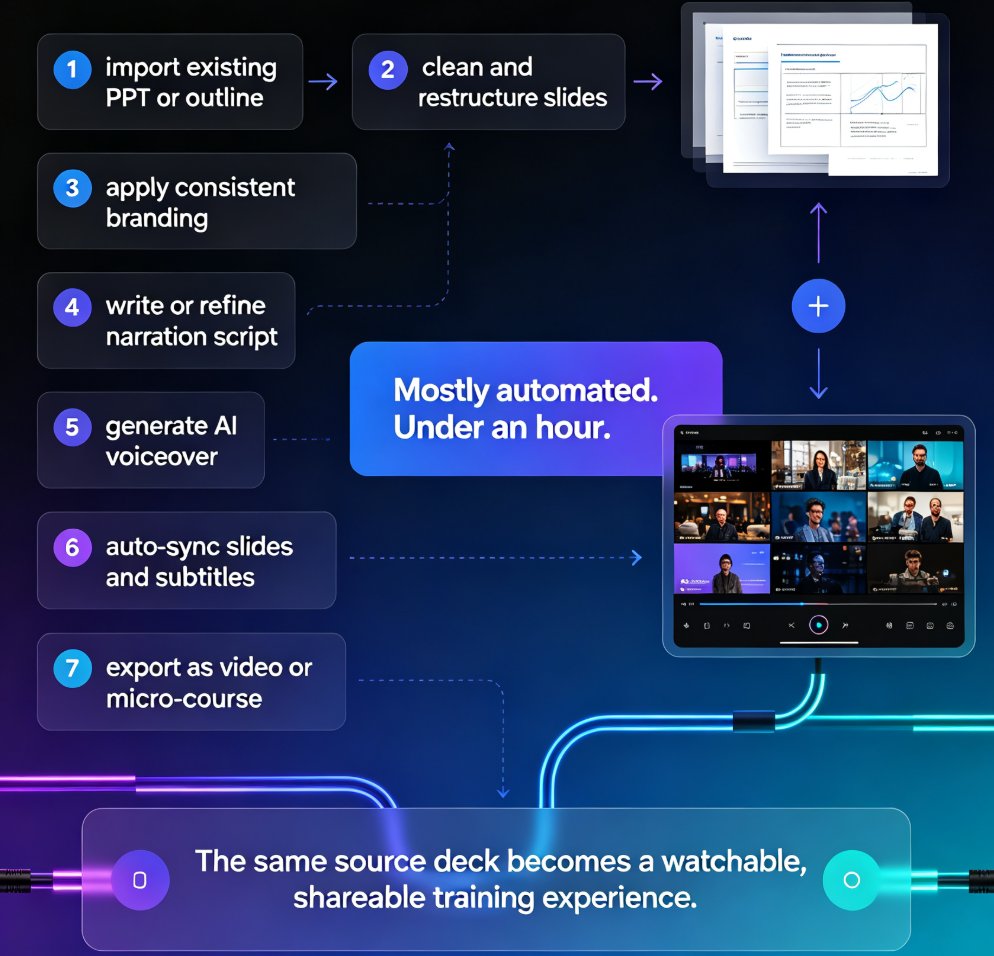
Here's the exact workflow, based on real-world usage. Total time: about 5 minutes for a 30-slide deck.
- Upload your PPT (30-60 seconds). Drag and drop your PPTX file into Zendeck. The AI parses your slides, charts, and speaker notes.
- AI generates script and visuals (2-3 minutes). Zendeck creates a narration script and re-renders your slides as animated video scenes.
- Edit the script (1-2 minutes, optional). Review the AI-generated narration. Tweak wording, adjust pacing, or add context.
- Customize branding (30 seconds). Apply your brand kit—fonts, colors, logos—to the video.
- Export (1-2 minutes rendering). Download your MP4 or WebM file, ready for your LMS.
A 50-slide deck becomes a 12-minute video course in about 8 minutes total. That's faster than a coffee break.
04 Why Video Beats Text for Learning
Let's talk about the science. Video engages multiple senses—sight, sound, and motion—which helps encode information into long-term memory. When you combine narration with animated visuals, you're giving the brain two channels to process the same information, which is the dual-coding theory in action.
Learners retain 65% of video content three days later, compared to just 10% of text-based content. That's a 6x improvement in retention. And it's not just about memory. Video courses also increase completion rates. When training feels like a Netflix episode instead of a textbook, people actually finish it.
For onboarding, this means new hires get up to speed faster. For compliance training, it means fewer retakes. For sales enablement, it means your team can watch a product demo on their phone during a commute.
05 Static Manual vs. Micro-Course: The Comparison
| Aspect | Static Training Manual | Zendeck Micro-Course |
|---|---|---|
| Format | Text-heavy PDF or PPT | Narrated video with animations |
| Engagement | Low—readers skim and lose interest | High—motion and audio keep attention |
| Retention | ~10% after 3 days | ~65% after 3 days |
| Completion Rate | 20-30% | 80-90% (typical for video) |
| Time to Produce | Weeks of writing and design | 5-8 minutes with AI |
| Accessibility | Requires reading effort | Works for auditory and visual learners |
| Updates | Manual editing, re-distribution | Re-export in minutes |
This table isn't just fluff—it's the difference between training that checks a box and training that actually changes behavior.
06 Time Breakdown: Where the 5 Minutes Go
To give you a clearer picture, here's a visual breakdown of the time spent in each step of the conversion process. This is based on a typical 30-slide deck.
07 Real-World Scenario: HR Onboarding at a Tech Company
Imagine you're an HR manager at a 200-person SaaS company. Every quarter, you onboard 15 new hires. Your current onboarding deck is 45 slides of company history, policies, and product info. It takes new hires two hours to read, and they still have questions.
With Zendeck, you convert that deck into a 10-minute narrated video. You add your brand colors and logo. You export the MP4 and upload it to your LMS. New hires watch it before their first day. They arrive already knowing the basics, so your live sessions can focus on deeper topics.
One HR team reported cutting onboarding time by 40% and seeing a 25% increase in new hire satisfaction scores. That's the power of turning static content into something people actually want to watch.
08 Tips for Getting the Most Out of PPT-to-Video
Here are a few things I've learned from working with teams that nail this:
- Keep text on slides minimal. The AI works best when slides have short bullets, not paragraphs. If your manual is text-heavy, trim it down before uploading.
- Use speaker notes. Zendeck uses your speaker notes to enhance the narration script. If you have notes, include them—they make the AI's script much better.
- Edit the script. Don't just accept the AI's first draft. Read it aloud. Adjust the tone to match your company's voice. It takes two minutes and makes a huge difference.
- Break long manuals into multiple micro-courses. A 20-minute video is too long. Split your manual into 5-7 minute modules. Learners prefer short, focused videos they can watch in one sitting.
- Add a quiz at the end. If your LMS supports it, add a quick quiz after the video to reinforce learning. This turns passive watching into active recall.
These aren't just tips—they're the difference between a video that gets watched and one that gets skipped.
09 Why Zendeck Stands Out
You might be thinking, "Can't I just use any AI presentation tool?" Sure, but Zendeck is built for this exact workflow. It's not just a slide generator—it's a full content creation platform that handles the entire journey from outline to video. You can import a Word outline, generate slides, apply your brand kit, and then convert to video—all in one place.
Zendeck's PPT-to-Video is the fastest way to turn your existing training materials into engaging micro-courses. No other tool combines AI slide generation, brand consistency, and video conversion this seamlessly. And because it's all in one platform, you don't have to juggle multiple tools or worry about formatting issues.
If you're already using Zendeck for presentations, adding video is a natural next step. If you're new, you can start with a free video to see the magic for yourself.
FAQ
How long does it take to convert a training manual to a micro-course with Zendeck?
A 30-slide PPT can become a 10-minute narrated video in about 5 minutes total. For a 50-slide deck, expect roughly 8 minutes to produce a 12-minute course. The AI handles parsing, script generation, and visual re-rendering automatically.
Do I need to keep my original slide animations when converting to video?
In slide-by-slide mode, Zendeck preserves transitions and object animations. In narrative mode, it replaces them with purpose-built video animations like sequential reveals and data highlighting, which are optimized for learning.
Can I edit the AI-generated narration script before exporting?
Yes. Zendeck generates a script from your slide text and speaker notes, and you can review and edit it before export. This ensures the final video matches your exact training objectives.
What file formats does Zendeck support for input and output?
You can upload PPTX files up to 100MB. The output is a narrated MP4 or WebM video, ready to upload to your LMS or share via link.
Will the video match my company's branding?
Absolutely. Zendeck applies your brand kit—fonts, colors, logos—to the video automatically. You can also customize branding in under a minute before export.
Ready to turn your training manual into something people actually watch? Start with Zendeck's PPT-to-Video and see the difference in your next onboarding session. Your new hires will thank you—and so will your completion rates.